
Changelog
Get the latest feature updates in Truv
Truv has rebuilt its income document upload experience across all three products — Document Upload for public sector, Document Processing for mortgage, and Doc Fraud Detection for consumer/auto lending and screening.
New Doc Upload benefits:
- Catch quality of documents upfront: End user is notified in less than 15 seconds, guiding the end user to upload better documents as needed.
- Minimum document indicator: Auto-displays for end user and is set by clients in Truv Templates (ex. 2 pay stubs, 1 W2).
- Customizable minimum and maximum size of each document: Set by clients at the account level.
- Unsupported doc type error: Auto-displays for end user in less than 15 seconds, guiding the end user to add new files (ex. documents that are not password protected).
- Bulk upload in one pass: Truv auto-groups documents uploaded in less than 15 seconds.
- Ability to add additional documents: End users can re-open the Truv experience and add more documents at any point, including post parsing.
- Last name mismatch display shown: End user has the ability to validate all documents are for the same user (ex. cases where a maiden name was changed).
- Enhanced auto-flagging for Truv clients: Auto-flags tampering or fraudulent documents and SSN mismatch, and errors moved from user level to employer level.
Following A/B testing, the results are higher conversion, fewer support tickets, and complete data on the first pass.
The new Doc Upload will be live for Truv clients on September 1, 2026.
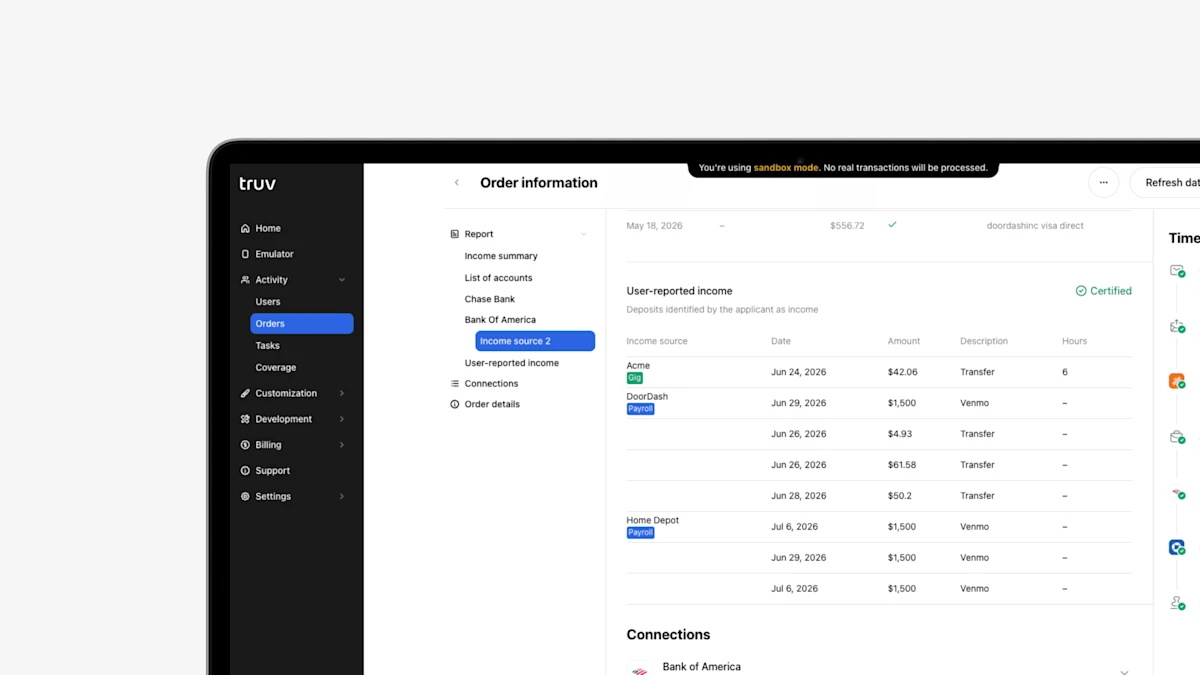
- Self-Certification Income Identifier in Truv Reports: Truv reports now include checkmark indicators next to self-certified income sources in a new Certification column, giving caseworkers a complete view of client-attested details alongside verified data.
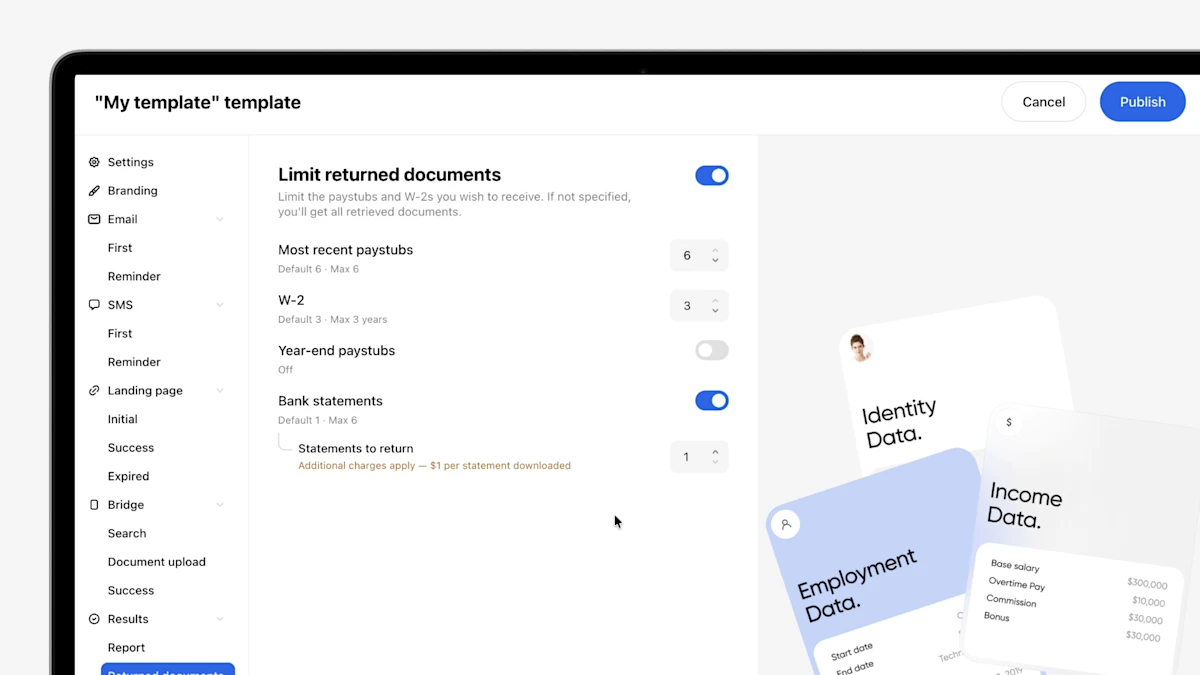
- Bank Statement Download Settings for Asset Verification: Asset Verification templates now include an optional Bank Statements setting. The feature is disabled by default, allowing users to enable statement downloads only when needed. Users can also view the maximum number of downloadable statements and understand that additional charges apply when the feature is enabled.
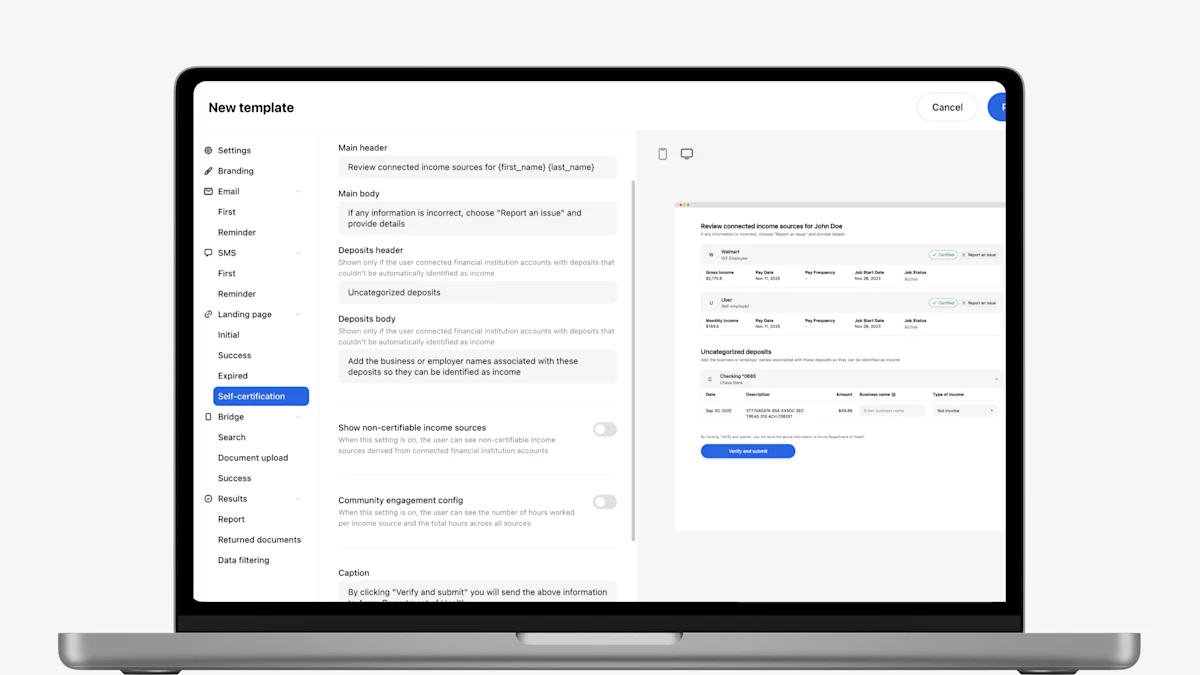
- Enable/Disable the Self-Certification Page Display Across Workflows: Self-Certification page customizations can now be enabled or disabled per workflow. For example, the Case Worker and Customer Portal workflows can have customization enabled, while the In-Person workflow has it disabled.
- Paystub Preview for Self-Certification: A paystub details preview is now available on the Self-Certification page. Because clients can see the exact pay history Truv retrieved — base salary, overtime, gross and net pay, and hours per pay period — they can certify income with full visibility into the underlying data, reducing back-and-forth and disputes after submission.
- Bank Income as a New Bank-Based Verification Option: Bank Income is income derived from bank transactions, and is now available as a bank-based verification option alongside self-employed income verification. Agencies can configure which reports are returned: bank income, self-employed income, or both. Because Bank Income draws transaction data, it generates a Self-Certification page tailored to that information for the client to review.
- Access Monthly Bank Statements from Verification of Assets: Truv has enabled clients the option to download monthly bank statements from VOA orders, unlocking use cases where statements are required for underwriting (i.e. brokerage, 401(k), and investment accounts where vesting and net balances need documentation for reserves, construction, non-QM, and non-investor loans). Lenders on Encompass have the ability to push bank statements directly to the Encompass eFolder.
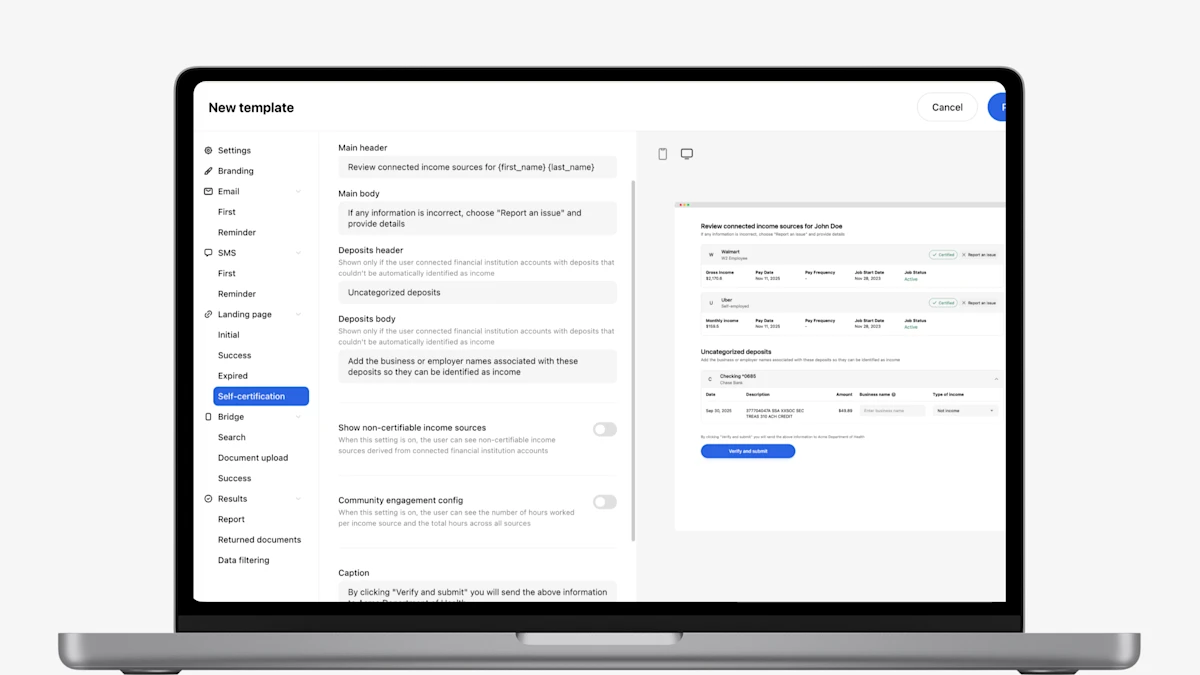
- Expanded Customization for Self-Certification Page: Manage the client experience and level of customization your client has on the self-certification page in Truv Templates, including showing non-certifiable income sources, community engagement configuration, and customizable instructional messaging for the client.
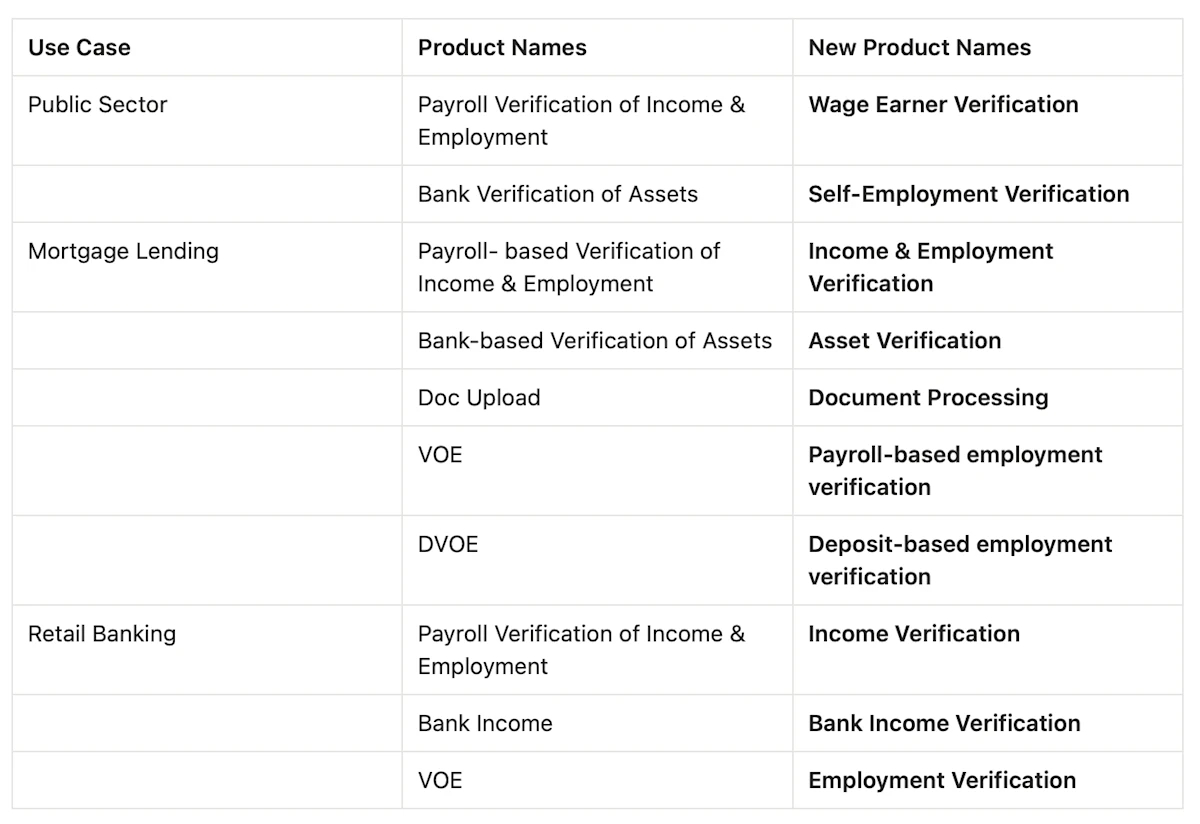
- Introduced new product names for Truv’s verification suite: Truv has introduced new product names for our suite of verifications that will display in Truv Dashboard, Truv templates, Truv Create order form, Truv orders, and integrated systems.
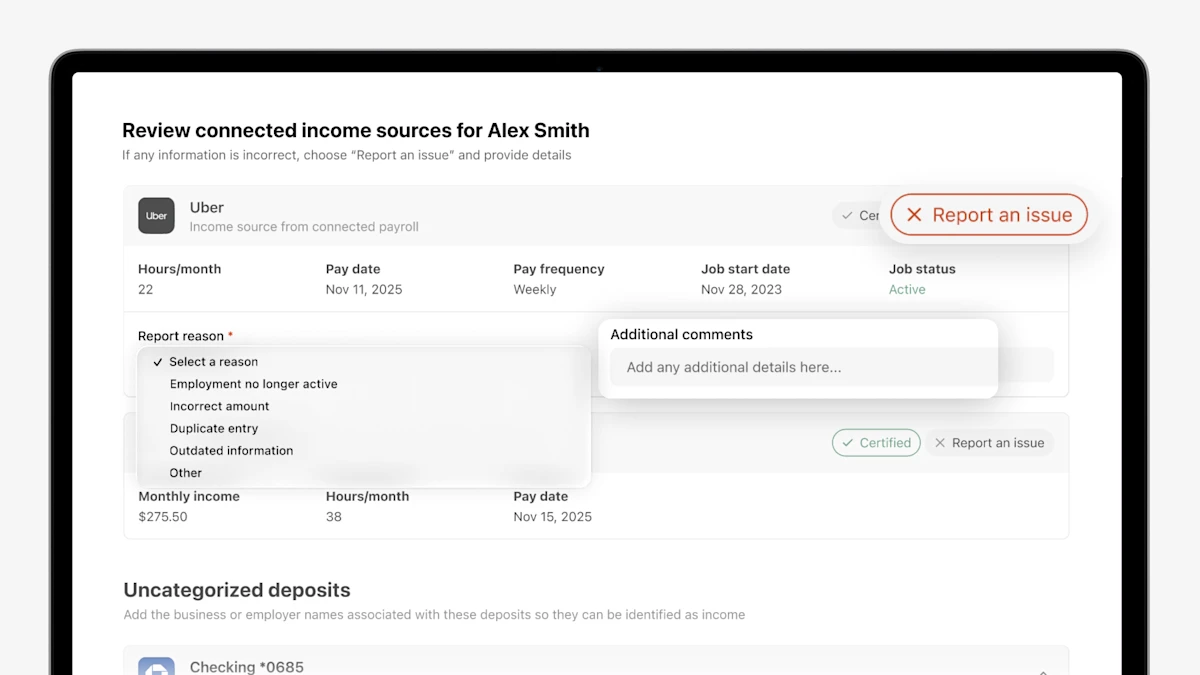
- Reporting an issue: Clients can flag inaccuracies directly on any listed income source or employer in the self-certification page view. By selecting "Report an issue," they can choose a reason from a dropdown (such as employment no longer active, incorrect amount, or outdated information) and add clarifying comments pre-submission.
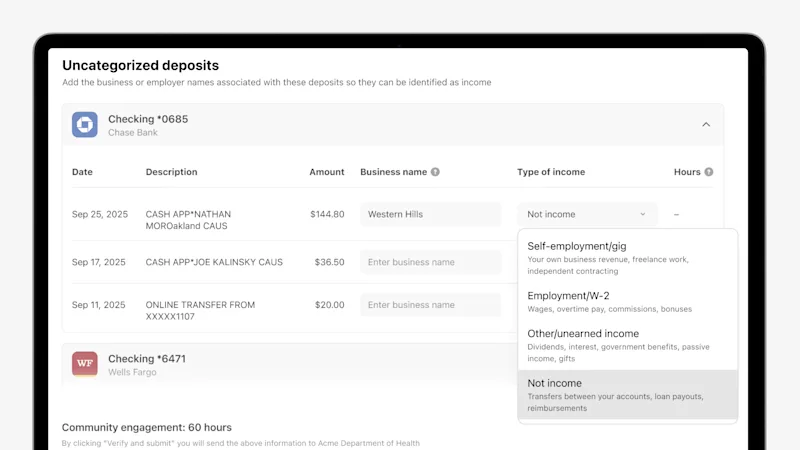
- Adding unidentified income from bank connections: If a client doesn't see an income source listed, they can now identify it themselves. In the Uncategorized Deposits section, clients can enter the business name and type of income alongside the corresponding bank transaction. This input is automatically displayed in the Truv Report and JSON response returned to the agency for caseworker review.
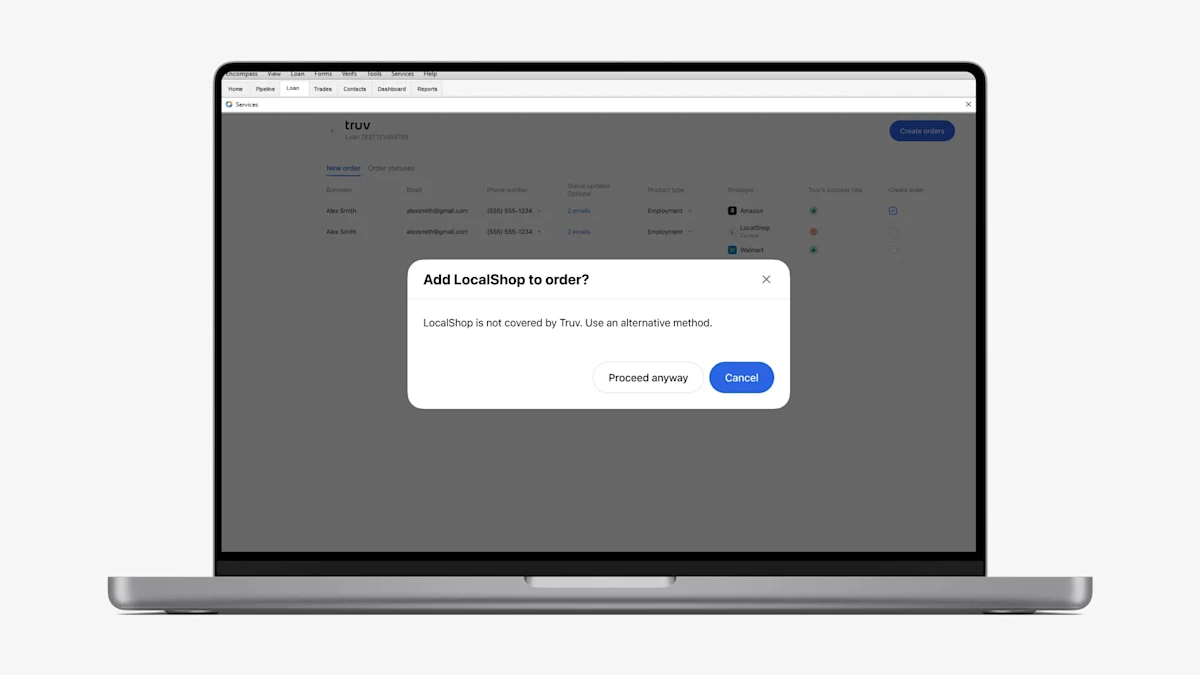
- Warning pop-up when adding unsupported employers: To help Encompass users decide the best verification solution to use for each borrower or employer, we have added a warning pop-up when trying to add an Unsupported company (red caution icon) to the Truv order in the New order tab of Encompass. Note, if the Document Upload solution is enabled on your account and template, we won’t show this pop-up since the verification can still be completed successfully with this solution.
- For Verification of Income and Employment orders that are refreshed in Encompass, we now preselect the ‘Employment’ option, to make pre-closing reverifications of employment easier for lenders.
- Unassigned Folder: As a fast follow to our eFolder Support feature that was release in May, now, lenders now have the option to send all returned documents from borrowers into the Unassigned File section within the eFolder. This offers more visibility into specific documents for underwriters, processors and loan officers if needed. From the Unassigned File section, the documents can be relocated into the eFolder.
- We’ve added the ability for Lenders to share a list of Loan Officer emails where the Truv verification flow will be blocked and all associated borrowers will follow the alternate verification pathway. Reach out to the Truv Implementation team to configure.
- New implemented configuration for custom eFolder Document Folders now enables automatic storage of various document types such as Paystubs, W-2s, 1099s, Invoices, Employer and Borrower reports.
- Email update: Loan Officers now have the option to use CC for status update notifications via email upon order creation.
- Notifications are now available for Loan Officers (LO) once an order is created, indicating that the borrower has been informed via email/sms with the notification link. This ensures prompt communication and transparency throughout the process.
- We added short links in place of long URLs.
- Added a client level setting to show or hide the links per client. Please reach out to Truv Implementations team to change this behavior.
- Truv always showed available templates in Encompass UI. We had the view limited to 10, but have now increased it so you can view all applicable templates in Encompass.
- For borrowers, we added a
Currenttag to indicate their current employments, assisting Loan Officers (LO), Loan Officer Assistants (LOA), and processors in identifying the borrower’s current employer and facilitating re-verifications. - In status update emails, we included Loan Number, Loan Originator, and Loan Processor details, providing recipients with comprehensive information for efficient tracking and communication.
- Introduced Verification of Assets into the existing SimpleNexus integration. Now Truv creates a combined notification consisting of VOIE & VOA in the same order and notifies the borrower just once to complete Income, Employment and Asset verification at once. Truv also sends out reminder emails for any orders that are pending through provided notification channels for borrowers.
- Improved design for order manager notifications regarding order status changes, featuring loan number, loan originator and what employer was ordered tailored to each status (CANCELED, EXPIRED, SKIPPED and COMPLETED), aiming to provide loan officers or operations team with clearer insights and facilitate decision-making. You can use it in both Encompass and Truv dashboard.
- Implemented a re-verification status warning for orders experiencing auto-refresh failure, where borrower engagement is needed. This specifically helps when the loan is about to close so LO’s and LOA’s can decide when to notify the borrower.
- Previously, the automated triggering(ASO) functionality activation left LOs without notifications upon order creation, resulting in uncertainty regarding borrower contact timing. Now, with the implementation of alerting, seamless communication and borrower interaction are facilitated.
- Enhanced the reporting functionality to include all employer level reports in Encompass eFolder for all borrower/co-borrower pairs along with borrower reports.
Borrower involvement for re-verifications
- We always try to do a BE refresh in case of re-verifications
- However, if there is an odd chance when borrower needs to be involved, we will let the LO/LOA know on click of re-verification.
Allow to copy-paste Truv Order URL and/or resend link to borrower
- In Encompass now the link is available if LO wants to just copy – paste the link and send it to the borrower via text or email.
Employer level reports available in eFolder
- In addition to Borrower level reports(submitted to GSE’s), paystubs, W2 now employer level reports are available in Encompass eFolders.
- This means LO/LOA’s no longer need to wait for the full order to be complete.
Changed defaults for lock behavior
- Applies to Encompass SmartClient only. Used to be 15mins for every 24 hrs now we request refresh every minute when the loan file is in locked status.
- In Encompass Web aka Encompass LOConnect, this is just an automatic refresh.
Canceling specific employments for a borrower
- Now you can cancel 1 out of many employers requested from the Encompass UI per borrower, this is similar to re-verification you can select what employer to re-verify, now after you have placed the order you can cancel 1 or more employers only for a specific borrower.
Borrower consolidation
- Now you can place multiple orders for the same borrower and Truv will consolidate all the reports per borrower in Encompass.
- This is helpful if LO’s/LOA’s have placed multiple orders for a specific borrower, we will consolidate before submitting to GSE’s.
- Incorporated employer level reports in Encompass eFolder in addition to Borrower reports, paystubs/1099’s and W2’s. No more waiting and get employer level reports as the borrower completes the verifications at the employer level.
- Cancel employers for a borrower or co-borrower at any time in the Truv experience in Encompass. We understand you may not need to wait to see if the borrower or co-borrower connected current and prior employments. You now have the flexibility to cancel or re-verify at the employer level.
Please find the guidelines and information about support of Freddie Mac’s AIM for VOIE with Truv in the documentation.
Launched SimpleNexus Integration Guide for third-party integrations
Embark on a new journey with Truv as we introduce an innovate experience for your customers. Now, managing external platform configurations is as seamless as ever. Your customers can easily copy and paste credentials, enter your Banno system URL, and generate keys for the Banno Administration Panel.
Discover this transformative change by logging into Banno today.
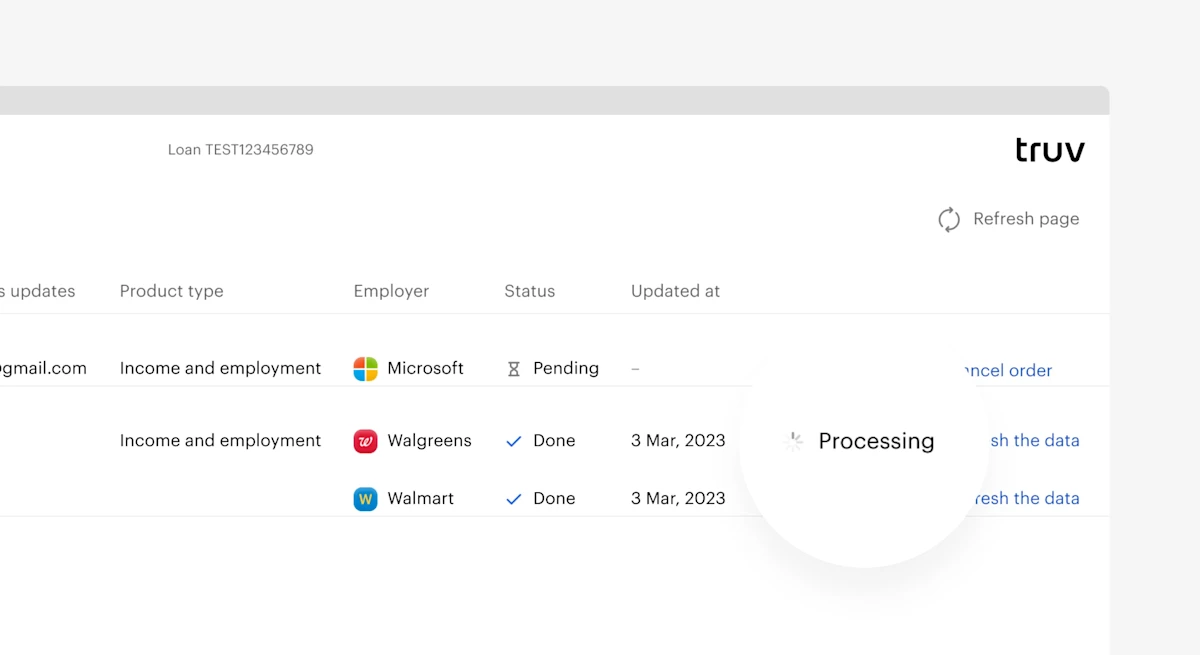
Truv has a significant number of mortgage customers who use Encompass as their Loan Origination System, which is why we’re committed to providing you with the best user experience possible.
- This past sprint we’ve added visibility into which documents are available and we’ve further synced the Truv dashboard with the Encompass experience. When viewing an order status in Encompass, users will now see a
Processingstatus for any documents that are still being uploaded via API. - Once the documents have been added to Encompass, users will be able to view and download documents from the orders status screen.
This enhancement helps to clarify which verification orders are completed and which are waiting for documents to be processed via successful connections.
To continue to support our growing mortgage segment, we are thrilled to announce our latest integration with SimpleNexus, an nCino company. SimpleNexus provides mortgage software and technology for the modern lender through their Point-of-Sale software that’s trusted by over 47,000 loan officers today.
- Having an integrated solution for mortgage lenders is essential, as loan officers encourage applicants to manage everything through their
Point-of-Sale system. Through Truv’s integration with SimpleNexus, this is possible by kicking off an income and employment verification request directly from SimpleNexus. - Once applicants reach a specified place in the loan application, an income and employment verification order will be submitted and the applicant will receive an email and/or text message to complete the request via Truv.
- All SimpleNexus customers can use this integration out-of-the-box today to reduce risk, reduce verification costs, increase efficiency, and ultimately, approve more funded loans to drive increased growth and profitability.
Contact the Truv Team Today to Get Started
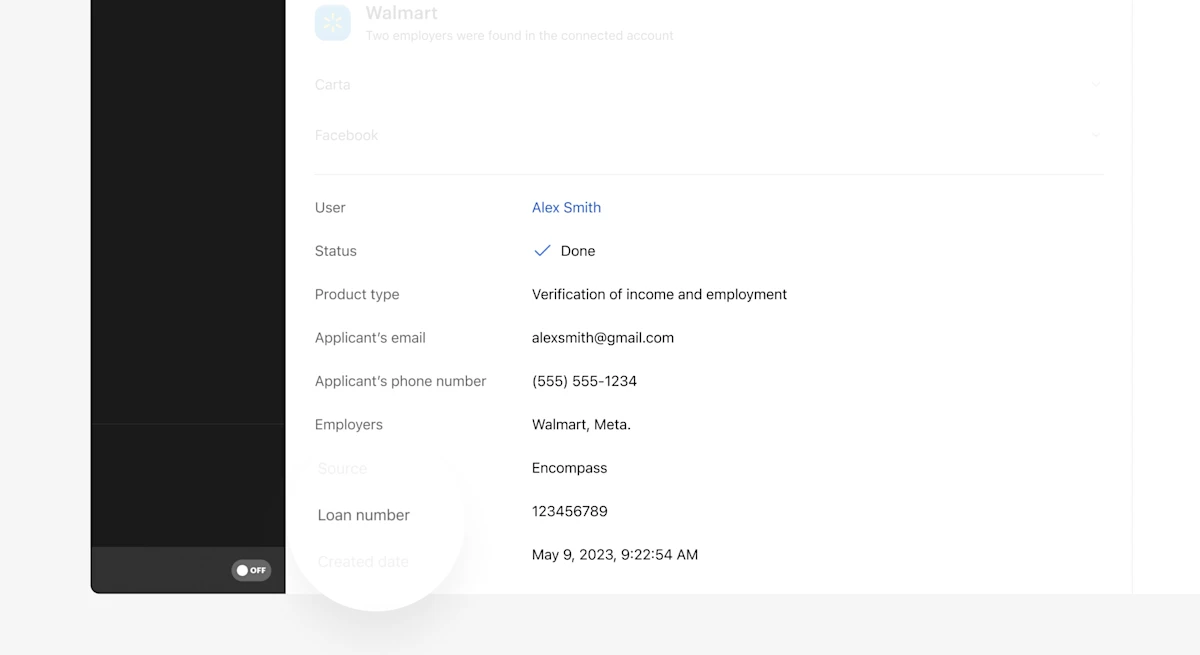
To further improve our Encompass integration, we’ve taken the loan number from inside Encompass and put that information in the Truv dashboard.
This will make it easier for you to reconcile verifications between the Truv Dashboard and your Encompass instance to find the information necessary to underwrite a loan.
Summer is officially here…and Truv is bringing the heat! Our product team has been busy the past two weeks pushing product improvements to production. We’re happy to report the following feature changes…
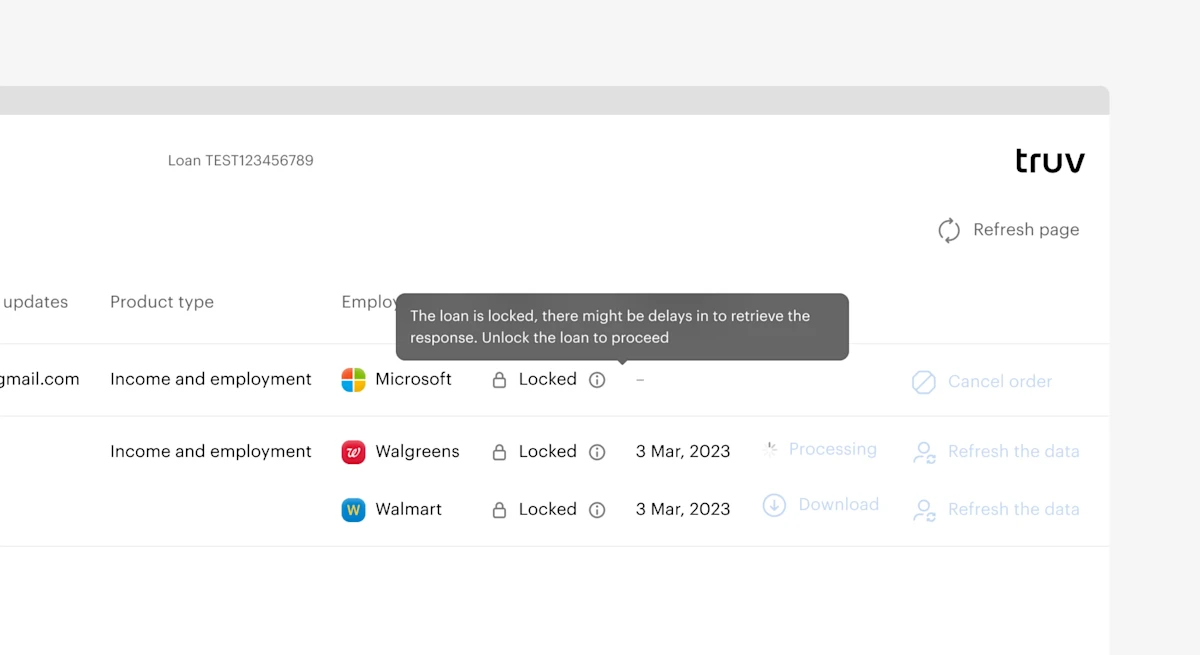
Encompass is where many of you choose to operationalize your lending business, which is why Truv is committed to providing you with the best user experience possible. This past sprint we’ve added visibility into the order status of an existing order.
- This gives someone working on the loan the ability to see if the order is locked before trying to take new actions.
- This feature will help reduce redundant work and keep Encompass orders in check.
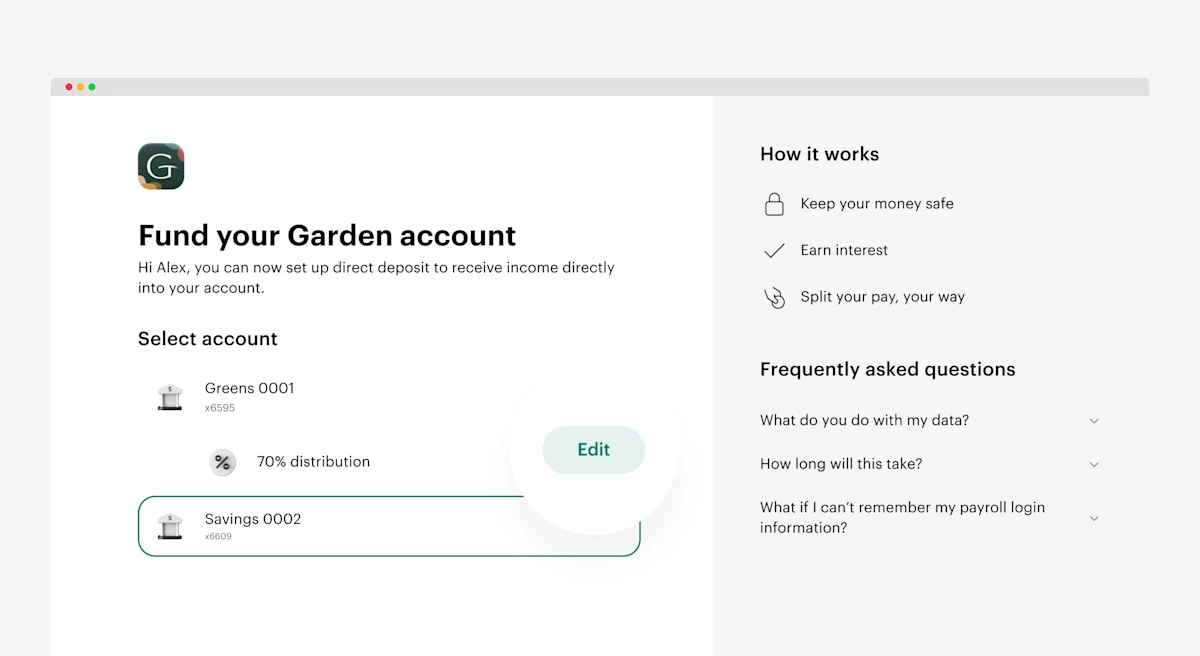
We’ve made it easier to adjust a direct deposit switch for customers using the Banno platform.
- When a user is reviewing their current direct deposit contribution, we now give the user the ability to edit the amount via a new
edit button. - This is a huge quality of life improvment for the end user and helps reduce any friction in the direct deposit process.
Login to Banno today to see the changes for your own customers.
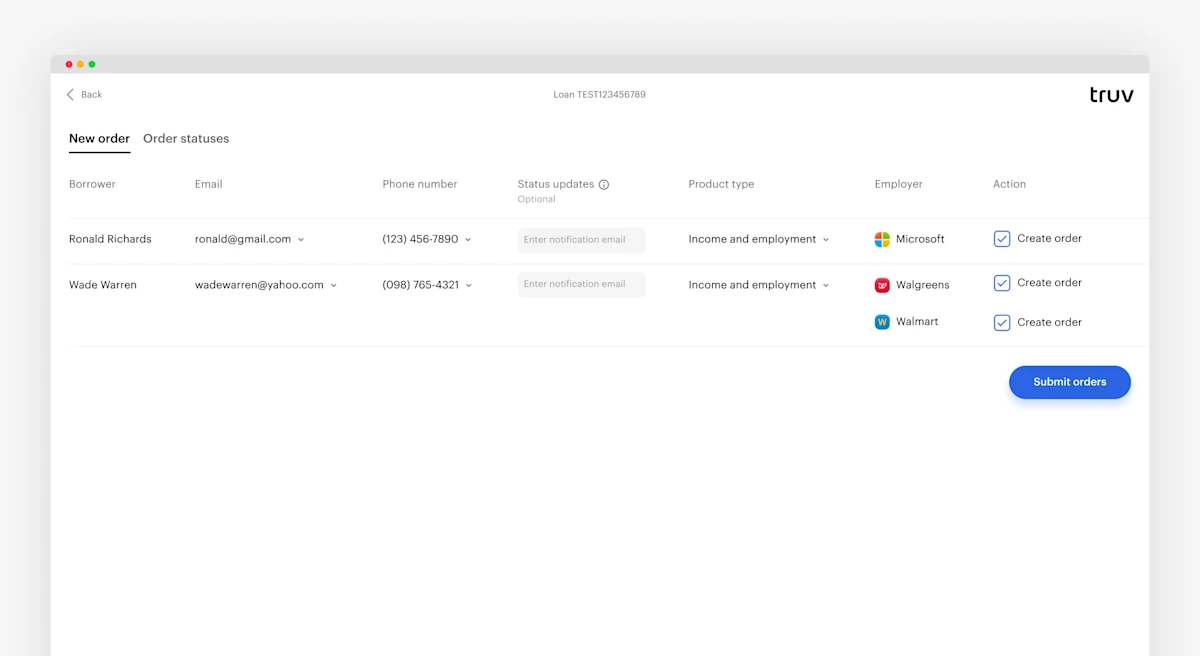
We’ve made big quality of life improvements for our customers leveraging Encompass. These UI changes help optimize Encompass workflows and reduce confusion across Truv functionality within Encompass.
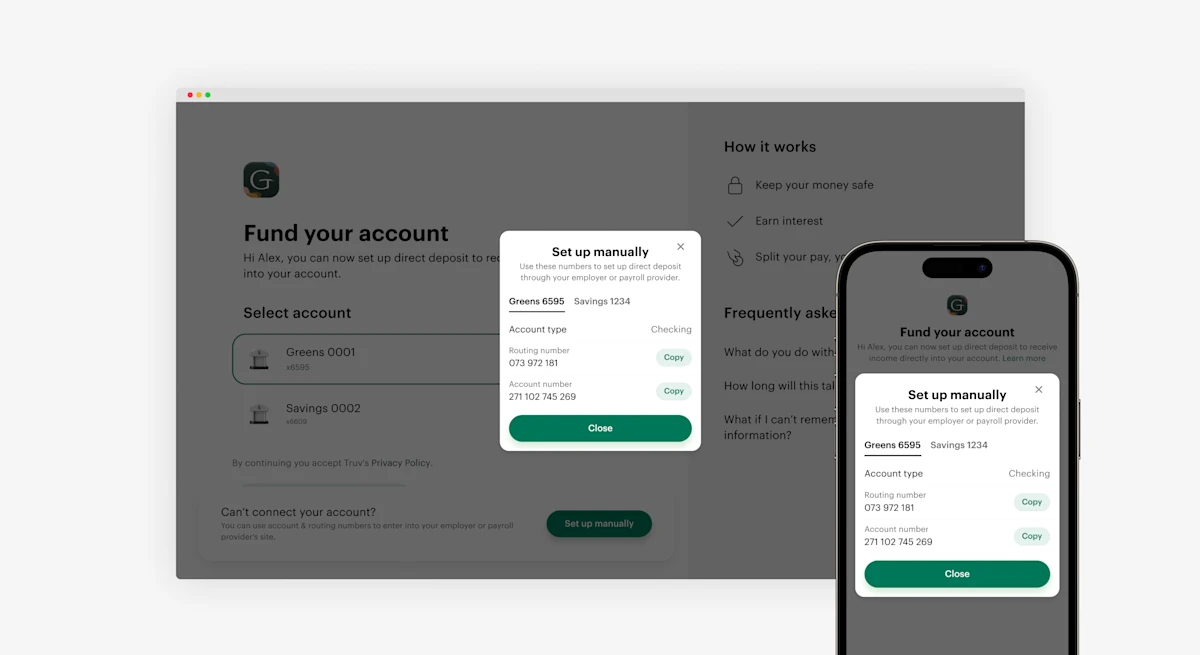
We’ve made it easier to manually set up Direct Deposit Switch DDS for customers using the Banno platform. When a user selects the type of institution to set up a deposit for, users are given the option to select I can’t connect my account. Clicking this prompt allows the users to set up their connection manually. This gives users another method to authenticate their deposit account and help increase conversion rates.
Our UI update for the Encompass Orders page adds a new field called Status Update. This field allows users to enter additional email contacts. This can be different managers needing notifications about updates to a specific Order status. This process now allows all relevant parties to stay informed on an Order status.
Encompass previously only displayed an overview of new Orders for Truv. We have now added tabs and let users to switch views between new Orders and Order status. We’ve also added new functionality to the Order status tab.
Encompass users can now cancel an order, download an Order report, or refresh Order data directly in the table. These buttons on the right of the table reduce the workload for Encompass users and allow them to create a more efficient workflow.
We’ve made enhancements in Encompass LO Connect and SmartClient based on feedback.
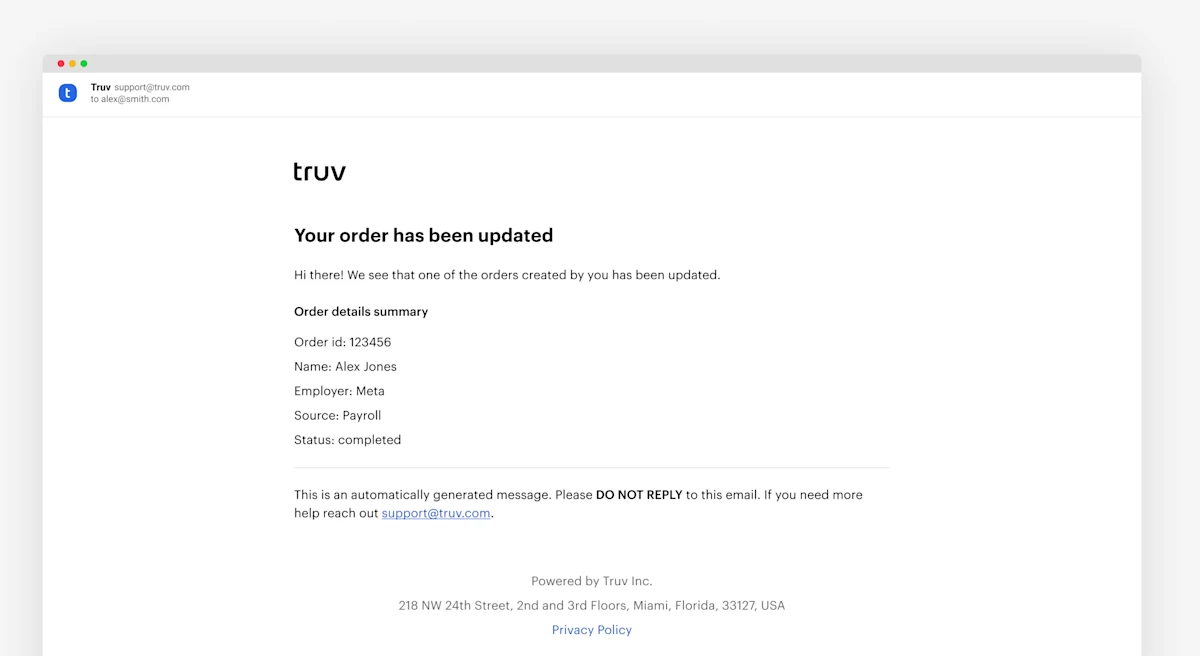
For Encompass clients, we have removed the Check order status button in Order notifications. These no longer redirect Loan Officers and Processors to the Truv dashboard. This update provides a more cohesive experience for all LOs.
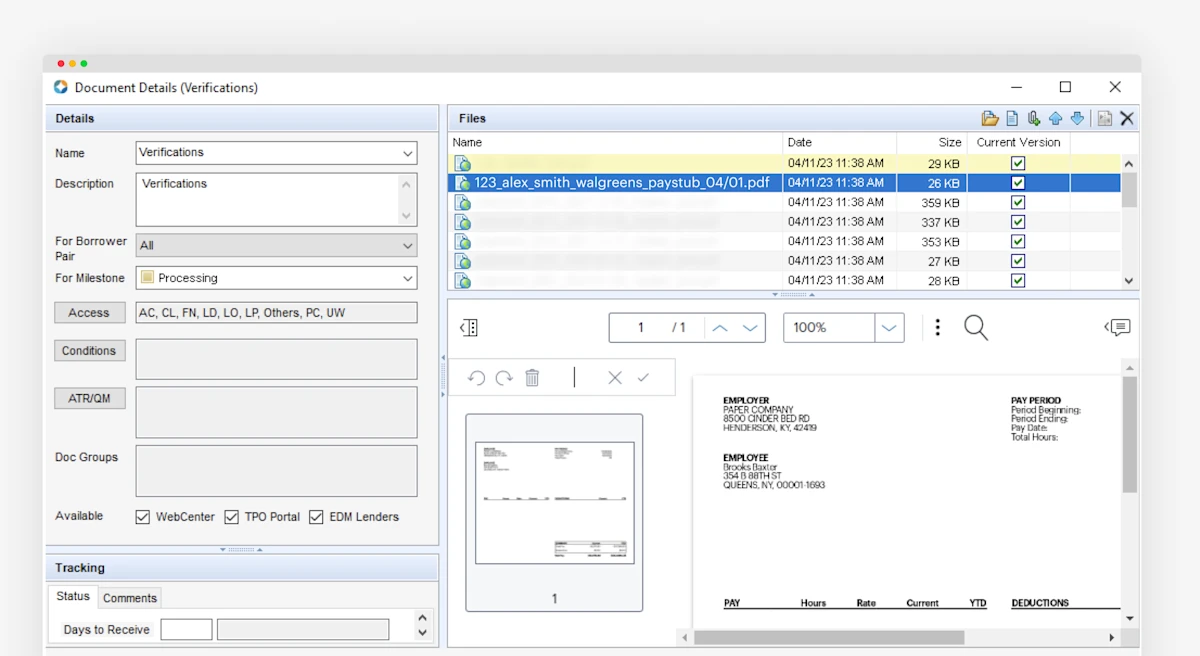
The numerous documents in eFolder without appropriate naming can be hard to differentiate. This applies for retrieving PDF reports, paystubs, as well as W2s. We’ve streamlined this experience by adding a naming convention to all documents returned from a verification check. This helps LOs and processors identify and organize the documents received from applicants.
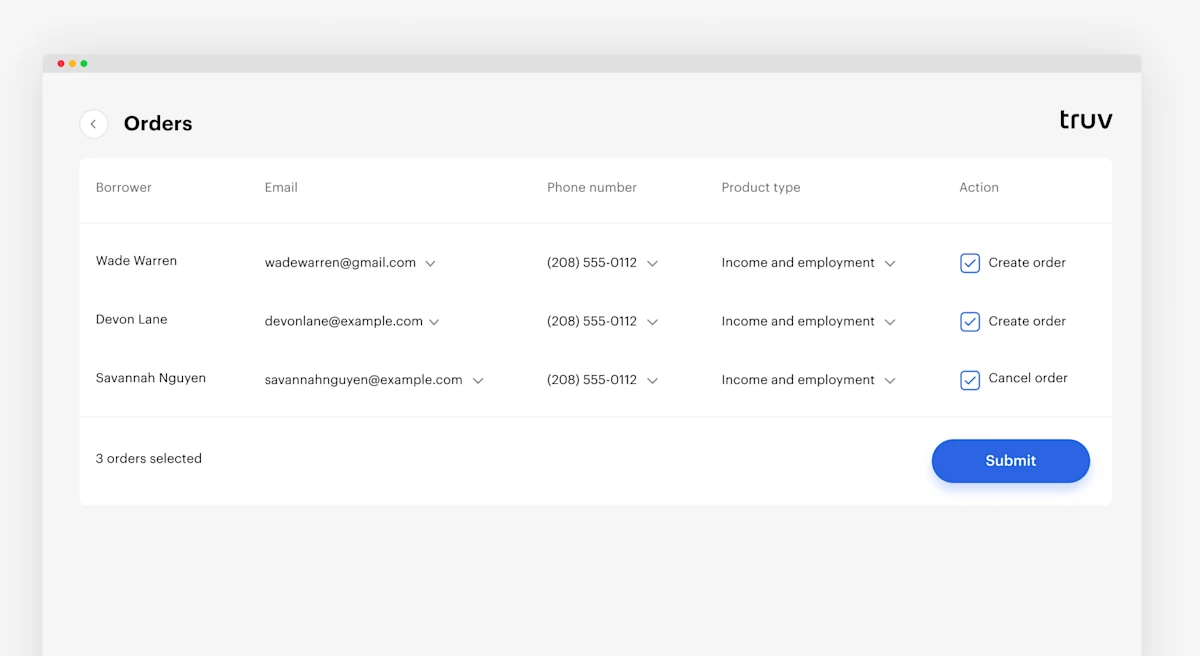
We have updated Truv flows to allow for the following enhancements.
- Default product type has been set to Income and Employment for creating Orders
- Loan Officers now can see applicant email and phone number when borrowers opt in to receive SMS updates
- On Order creation, the columns
StatusandOrdered dateare hidden to help streamline workflows
Order Notifications: We’ve added Encompass notifications of order statuses for order creators. These notifications include User Name, Employer Name, Order ID, Source, and Status. This allows an organization to keep creators informed and work more efficiently.
Previously, after verification was completed, we would surface the term Payroll data as the data source in both Accio and Tazworks. Now, in Tazworks in the How verified field, and in Accio in the Source field, you will see the actual payroll provider’s name listed for each verification.