
Changelog
Get the latest feature updates in Truv
Custom sandbox test data: You can now create your own payroll test cases in sandbox, for cases the built-in test credentials don't cover. Each scenario sets:
- A login to sign in with in Truv Bridge
- The data it returns: employments, paystubs, W-2s and bank accounts, with your own PDFs attached if you like
- How the connection behaves: success, a specific error, a delay, or multi-factor authentication
Scenarios work with sandbox API keys only and have no effect in production.
See Custom Sandbox Data for the guide and examples, and the Sandbox API reference for endpoints.
Date of birth on order creation: You can now send an optional date_of_birth when you create an order. Products that identify an applicant by date of birth can use it, and until now the field could only be set by creating the user first. Existing integrations are unaffected, and an applicant who already has a date of birth keeps it.
Available in:
- Create an order endpoint
PCS orders document upload: Customization templates now accept a pcs_orders document type under document_upload, configured like every other type — enable it, mark it required or optional, set the title, description, button and submit labels, and the minimum and maximum number of files. PDF, JPEG and PNG uploads are accepted. It is disabled by default, so nothing changes for existing templates until you turn it on. See the Templates object reference and the template update endpoint.
Uploaded orders are parsed and returned by the parsed documents endpoints with a document_type of PCS_ORDERS. Their parsed_data carries the service branch, rank normalized to a pay grade, current and future duty stations, the report no later than date, tour length, dependent information and the active duty service commitment, each when available on the order.
Custom labels for the order landing page buttons: The call-to-action labels on the order landing page are now configurable per template under orders.landing.buttons. Five keys are available, each up to 50 characters: connect, add_account and try_again for the connect button, and review_accounts and submit_accounts for the finish button. Every key is null by default, so the current wording stays in place until you set one. Labels render on one line and longer text is truncated, so keep them short. See the customization guide for which button each key controls.
Hide uncategorized deposits during self-certification: With bank income self-certification, the review screen shows an Uncategorized deposits section listing bank deposits Truv could not attribute to an income source. Set the new orders.self_certification.hide_uncategorized_deposits flag to true on a template to drop that section. Per-employer income sources stay certifiable, each with its own certification and amount. Defaults to false. See the self-certification guide.
New test credential with no pay frequency: Added goodlogin.nofrequency to the sandbox test credentials for income and employment verification. It returns an active hourly full time employment where pay_frequency and pay_rate are both null, so you can test how your integration handles a missing pay frequency instead of assuming one of the five cadence values is always present. See the Income and Employment testing page.
Monetary values across the API are moving to a single representation: a decimal string with two decimal places, such as "2697.36". The majority of monetary fields already use this format. On September 25 2026, the remaining fields that currently return a JSON number switch to the same format, so every monetary value in the API is represented consistently.
Asset verification reports
Four fields change on GET /v1/users/{user_id}/assets/reports/{report_id}/ and POST /v1/users/{user_id}/assets/reports/:
accounts[].balances.balanceaccounts[].balances.available_balanceaccounts[].balances.credit_limitaccounts[].transactions[].ending_daily_balance
This also resolves an inconsistency within a single response. The same account balance was returned as a number under balances and as a decimal string under summary. Both now use the decimal string.
Before:
{
  "balances": {
    "currency_code": "USD",
    "balance": 2697.36,
    "available_balance": 1359.82,
    "credit_limit": null
  },
  "summary": {
    "currency_code": "USD",
    "balance": "2697.36"
  },
  "transactions": [
    {
      "amount": "0.61",
      "ending_daily_balance": 2697.36
    }
  ]
}
After:
{
  "balances": {
    "currency_code": "USD",
    "balance": "2697.36",
    "available_balance": "1359.82",
    "credit_limit": null
  },
  "summary": {
    "currency_code": "USD",
    "balance": "2697.36"
  },
  "transactions": [
    {
      "amount": "0.61",
      "ending_daily_balance": "2697.36"
    }
  ]
}
These fields continue to return null when a value is not available.
See the Balances object and Transactions object reference.
Scoring attributes reports
Two fields change on GET /v1/scoring_attributes/reports/{report_id}:
derived_incomes[].average_amountderived_incomes[].monthly_amount
Before:
{
  "derived_incomes": [
    {
      "average_amount": 475.99,
      "monthly_amount": 1003.21
    }
  ]
}
After:
{
  "derived_incomes": [
    {
      "average_amount": "475.99",
      "monthly_amount": "1003.21"
    }
  ]
}
scores[].value and metrics[].value are not monetary values and are unchanged.
See the Scoring attributes object reference.
Direct deposit and paycheck linked lending reports
deposit_value is now always returned with two decimal places on:
GET /v1/links/{link_id}/direct_deposit/report/GET /v1/links/{link_id}/pll/report/GET /v1/users/{user_id}/deposit_switch/report/
Before:
{
  "deposit_value": "25",
  "deposit_type": "percent",
  "is_confirmed": true
}
After:
{
  "deposit_value": "25.00",
  "deposit_type": "percent",
  "is_confirmed": true
}
The value itself does not change. Where deposit_type is percent, the field continues to express a percentage rather than an amount. deposit_value on the bank account object already used two decimal places and is unchanged.
See the Direct deposit report object reference.
Pay statement rates and units
rate and units on earnings are a pay rate and a quantity rather than monetary amounts, so they keep variable precision instead of moving to two decimal places. Values carrying more than six decimal places are now rounded to six. All other values are unchanged.
This affects earnings[] and earnings_ytd[] wherever pay statements are returned, including GET /v1/links/{link_id}/statements/, GET /v1/links/{link_id}/income/report/, and GET /v1/orders/{id}/.
Before:
{
  "name": "Regular",
  "amount": "1935.77",
  "rate": "17.0000",
  "units": "41.666666666666664"
}
After:
{
  "name": "Regular",
  "amount": "1935.77",
  "rate": "17.0000",
  "units": "41.666667"
}
See the Earnings object reference.
What is not changing
- Request bodies. Both
2500and"2500"continue to be accepted wherever monetary values are sent. No changes are needed to code that creates orders, tasks, or reports. - Field names, on every endpoint.
nullfor values that are not available.- The amounts themselves. Only their JSON representation changes.
- Every monetary field that already returns a decimal string, which is the majority of the API.
What to check in your integration
- Code that parses these fields as JSON numbers should parse decimal strings instead.
- Statically typed clients need the field type updated from a number or double to a string.
- In JavaScript,
JSON.parsereturns these fields as strings, so arithmetic on them needs an explicit conversion.
New hourly full time test credential: Added hourly.fulltime to the sandbox test credentials for income and employment verification. It returns an active full time employment paid at an hourly rate, alongside the existing salaried full time and hourly part time scenarios. See the Income and Employment testing page.
Variable hours on the hourly test credentials: hourly.fulltime and hourly.part-time now return different hours on alternating pay periods, so gross pay changes between statements while the hourly rate stays the same. Both previously returned identical hours and gross pay on every statement. If your tests assert fixed amounts for these two credentials, update the expected values.
A webhook endpoint that returns no successful (2xx/3xx) response over a sustained period while failed deliveries keep accumulating is now switched off instead of retried indefinitely. A brief outage or a few scattered errors does not qualify, and endpoints where only some event types fail are left alone.
We warn first: the account owner, and the alerts email set in the Dashboard when there is one, gets an email naming the failing endpoints, and the endpoint is only disabled if it is still failing several days later. Events that occur while it is disabled are not delivered and are not replayed afterwards, so fetch anything you missed through the API.
You can re-enable an endpoint at any time under Development → Webhooks in the Dashboard, or by sending {"enabled": true} to the Update webhook endpoint. The enabled flag is also returned when listing webhooks.
See the Update a webhook reference.
Loan application number: The loan object on an order now accepts an application_number (the POS file number) as an alternative to loan_number. A loan must supply at least one of the two identifiers; loan_number is no longer required on its own. The new field is returned in the loan object on order create, retrieve, and list responses, so if you validate responses against a strict schema, update it to allow application_number.
This supports POS-first workflows where the file exists before the LOS has assigned a loan number. If you currently send a placeholder in loan_number, we recommend moving that value to application_number and populating loan_number only once the real one is assigned. In the near future, loan_number will no longer be editable once set, and attempts to change it will be rejected. That change will be announced separately.
See the Loan object reference for the full loan schema.
Provider category field: We're adding a new category field to the Data Provider object that classifies each provider by the type of income it represents: w2 for traditional W-2 payroll employers, gig for gig-economy platforms, and benefits for government benefits providers.
The field will be returned by the List providers (GET /v1/providers/) and Retrieve provider (GET /v1/providers/{id}/) endpoints starting August 6, 2026. This is an additive change and requires no action for most integrations. If you validate API responses against a strict schema, update it to allow the new category field before then.
See the Data Provider object reference for the full schema.
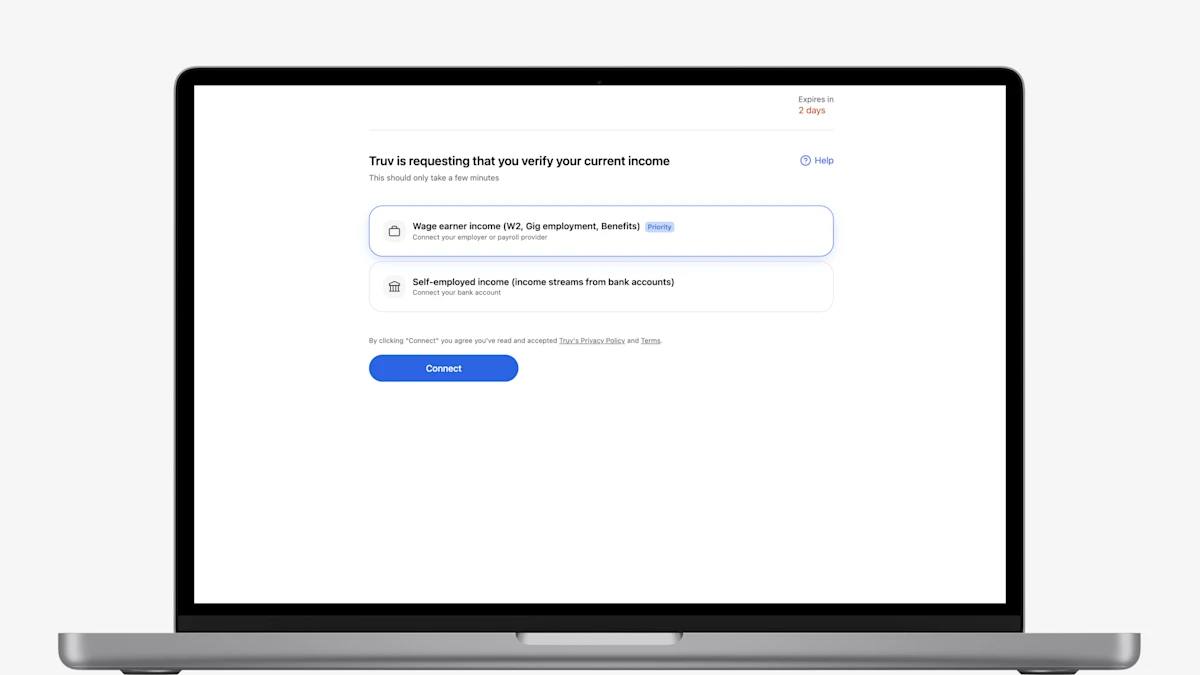
- Redesigned Truv Orders Landing Page: The Truv orders landing page has been refreshed and redesigned to improve conversion and client experience. The updated landing page will be live on September 1, 2026, available to enable upon request for pilot before September.
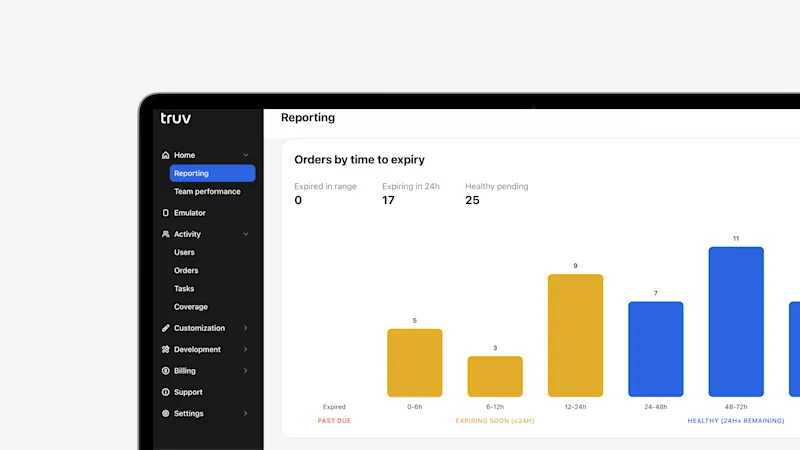
- Enhanced Reporting Tab in Truv Dashboard: For all Truv clients, in Truv Dashboard > Reporting tab, you can now view breakdowns of orders by time to expiry, filter by multiple data sources at once, and see details on error distribution including the top five error messages by category.
- Expanded Order Expiry Settings in Truv Templates: Clients can now customize how long orders remain active before automatically expiring when at least one employer or account has been completed but the user has not clicked Finish to share their data. The default expiration remains 24 hours, but clients can configure a shorter or longer timeframe based on their workflow.
- Email Title Field in Truv Templates: Truv Templates now include a Title field for first and reminder emails, giving you control over the subject line clients see.
- New Order and Refresh Grouping in Truv Dashboard: In the Orders tab, an initial order and all of its subsequent refreshes are now grouped together, so the full history of a single verification appears in one place.