
Changelog
Get the latest feature updates in Truv
See why a verification was flagged for fraud: When Truv flags a task or link as suspicious, you can now see the reasons behind the flag. Each reason says what was found and which documents it applies to. Its severity tells you whether the finding is fraud, suspicious and worth a manual review, or a document quality issue. To get the reasons, add show_fraud_reasons=true to your request. Existing integrations are not affected. Reasons are available for tasks and links checked from October 30, 2026.
Available in:
- Tasks: List all tasks and Retrieve a task
- Links: List all links and Retrieve a link
- Users, with
list_links=true: List all users and Retrieve a user - Link reports: employment history, income and employment, direct deposit switch, paycheck linked loan and bank income
See Read fraud reasons for every reason code and severity.
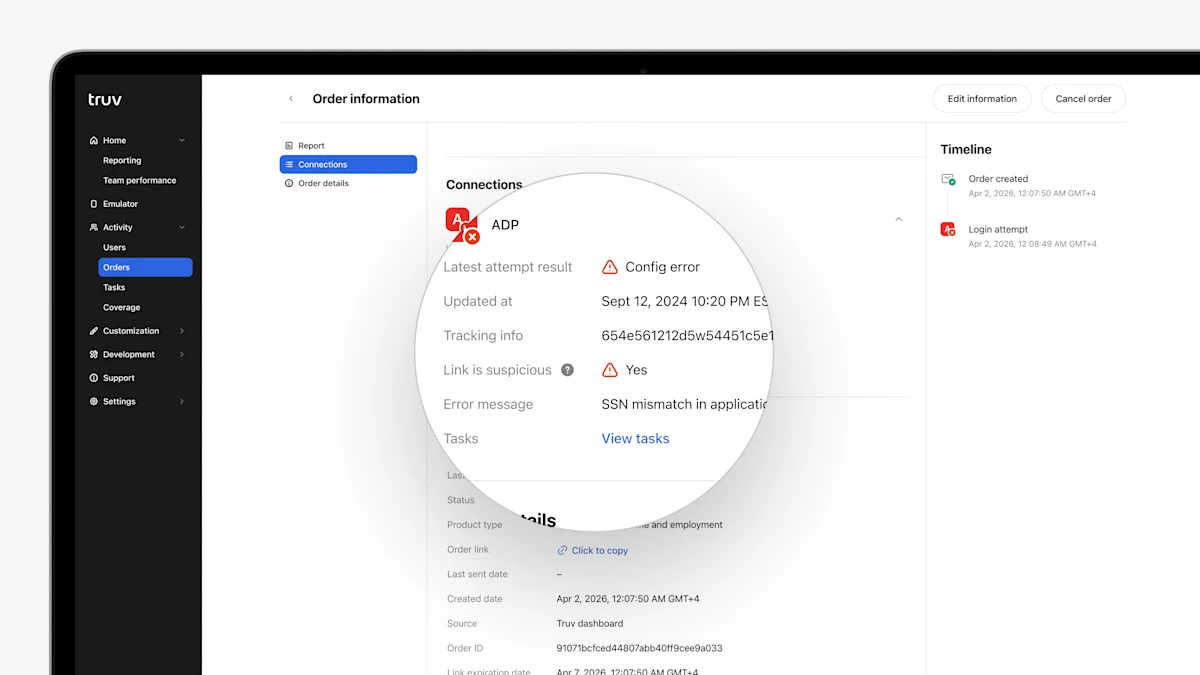
- Link is suspicious column in Orders and Users tables: To provide quick reference for suspicious links in Truv Dashboard, we have added a 'Suspicious' column to the Orders and Users tables, showing if the latest task for each provider is suspicious.
- Latest error message in 'Connections' for Orders and Users: To make troubleshooting unsuccessful connections easier, we have added the Error Message for the latest attempt for each provider to the 'Connections' section in Orders and Users.
- Performance per Template in Reporting: To improve visibility into verification volume and performance, we have added a table to show volume and conversion by template and initial vs. refresh order to the Dashboard Reporting tab.
- Self-Employed Income report template customizations: For public sector customers who want to control which account or transaction categories are included in the Self-Employed Income report JSON and PDF, we have added the ability to filter categories in Truv templates. Additionally, templates also support customizing which categories are visually labeled in the report PDF.
- Bulk upload orders enhancements for Public Sector: In Truv Dashboard, public sector teams can now upload a CSV file to bulk create up to 100 orders at a time, instead of one-by-one. We have enhanced this feature to support additional Truv products, including Self-Employed Income, Wage Earner Income + Self-Employed Income, and fields (status updates), as well as clarified instructions.

- Updated Employer Report Design: Truv has updated the format and design of the link-level reports (aka employer report) to match the formatting of the user-level reports (aka borrower report).

- New Incomplete Income Disclaimer: To prevent lenders from rejecting an application in scenarios where a non-EOY paystub is causing artificially low annual income summary values, we have added a disclaimer to the report PDF to identify this scenario.
- Enhanced Report Text Display: In rare cases on the Truv PDF report, the email address or certification text could overlap with other data, which has been fixed.