
Changelog
Get the latest feature updates in Truv
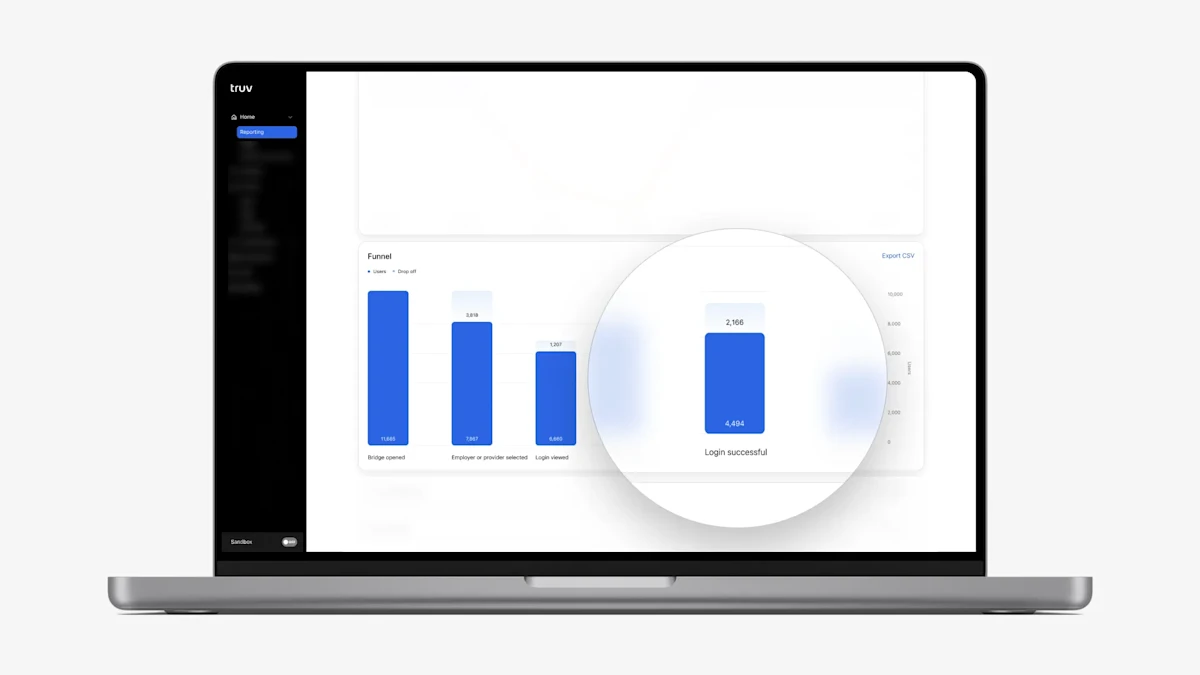
- To increase transparency into conversion, we added a ‘Login successful’ step on the Funnel chart in the Home → Reporting **tab of the dashboard. This allows clients who use Truv via both Orders and Embedded flows to see the count, conversion and drop-off associated with this step.
- We added an ‘Export CSV’ button on the Home → Team Performance tab in the Truv Dashboard to allow users to download the current table as a csv file. This allows users to use the presented data for operations optimization and training efforts.
- In the Truv Dashboard → Orders tab, we always showed the option to ‘Download all PDFs’ for a completed order regardless of how many files were available for download. To eliminate confusion around what documents are available, in cases where there is only one PDF file available we removed this option and only show the download link for the file.
- For clients using the Truv Embedded workflow, we have improved the formatting of the results returned in the Activity → Users tab. Clicking into a User row will now show:
- a submenu on the side to organize the task details and information
- a dropdown list on the top right (shown with three dots ”…”) to allow download of all available documents
- consolidated user information and task details at the bottom of the page