
Changelog
Get the latest feature updates in Truv
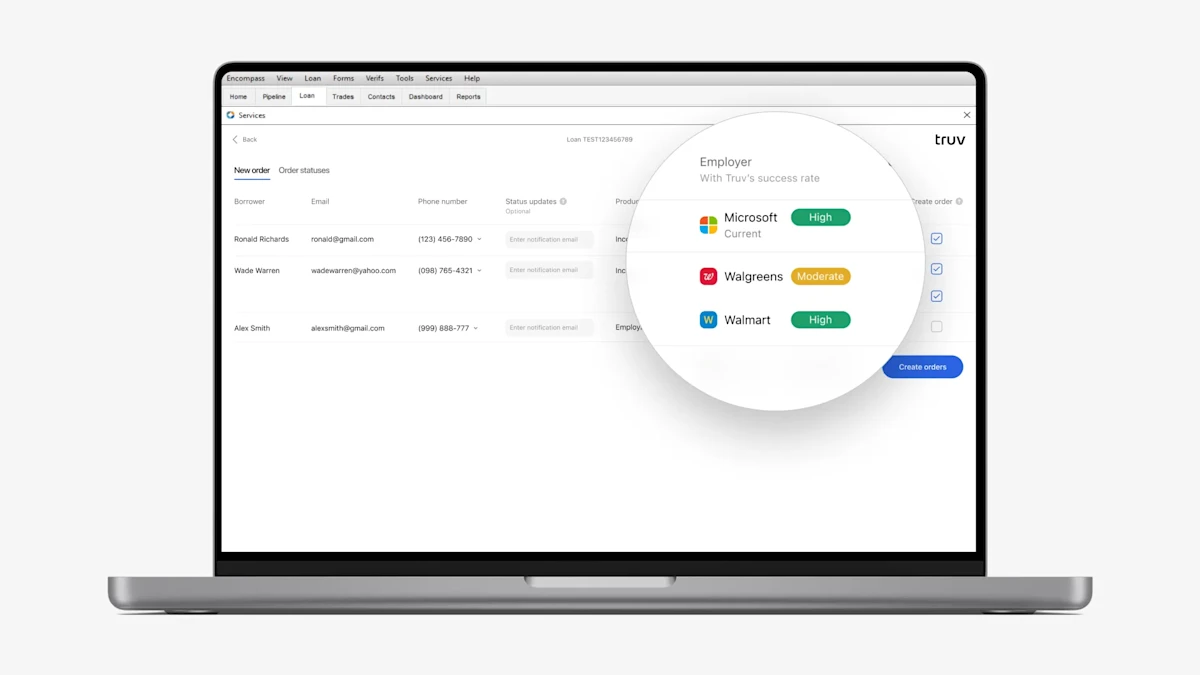
- To give lenders using Encompass visibility into success rate before placing an order, we added success rate indicators to the ‘New order’ tab of the Truv app in Encompass. These indicators match what is shown in the Truv Dashboard → Create order form and Truv Dashboard → Coverage tab.
- Green – verification expected to succeed, send the order
- Yellow – may succeed, send if the user is confident or guide them through the verification
- Red – verification via payroll is not feasible, try an alternative method
- To help streamline lender ordering, we added a setting to default add the Borrower’s cell phone number from the loan application as a notification method. Reach out to implementation@truv.com to enable this feature.
- In the Encompass loan application, previously if a lender deleted an employment, we would still show an empty placeholder in the Truv app in Encompass → Create order tab. This causes confusion and could result in sending borrowers blank orders to complete that weren’t required. Now, when an employer is deleted, we won’t show an empty placeholder row in the Create order tab and will only show rows for valid employers in the application.
- After an initial verification of Income and employment is completed, lenders can order a reverification in the Encompass Truv app → Order status tab by pressing “Refresh data”. Lenders can select ‘Employment and most recent paystub’ as a refresh option which will generate a verification of employment report and return the most recent paystub. Previously, we only attached the paystub to the verification report and did not upload it to the eFolder causing confusion and delays. We now also upload it to the eFolder so it will be easily accessible in the loan file and speed up the reverification process.