

Elevating Our Flagship Product
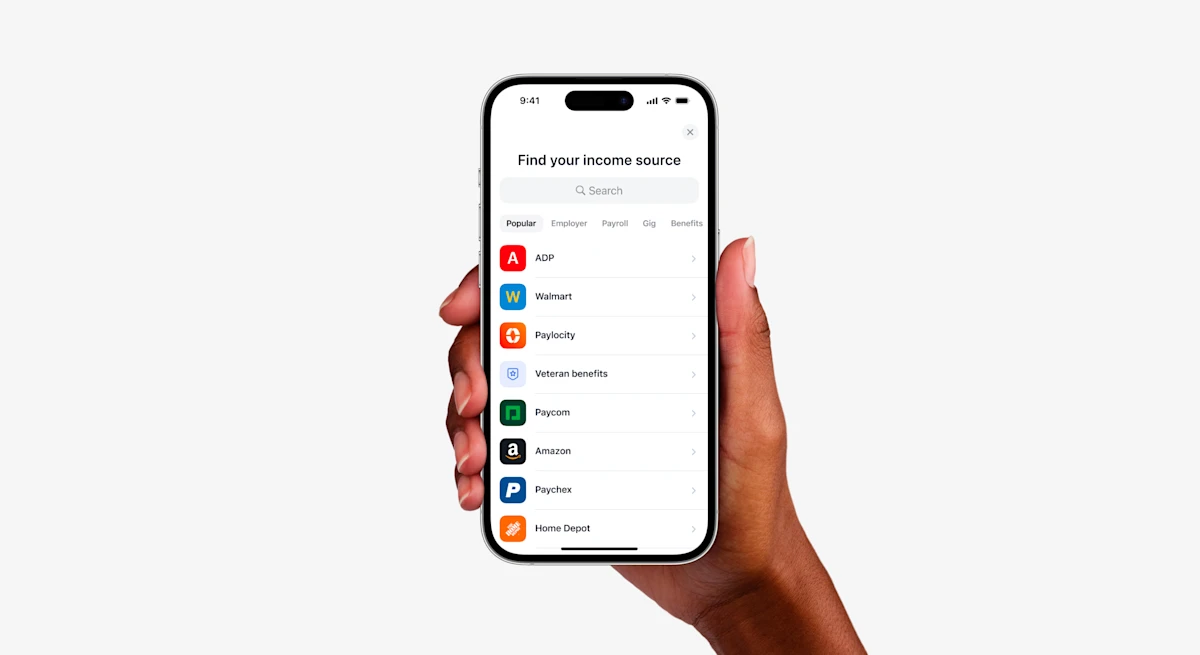
In the fast-evolving world of open finance, Truv continues to set itself apart by reshaping technology that shifts how lenders operate. Today, we’re thrilled to introduce the enhanced Truv Bridge experience, a redesign of our flagship product. This redesign promises an even smoother, more efficient, and more intuitive experience, cementing Truv’s position as a pioneer in income and employment verification, direct deposit switching and more.
Taking Our User Experience to New Heights
At Truv, we understand that seamless user experiences drive success for both our clients and their customers. With this principle at heart, we embarked on a journey to reimagine the Truv Bridge UI. Our team meticulously reviewed and edited design and content for consistency, scalability, readability and accuracy. This approach guarantees a unified experience across diverse user scenarios, whether a user logs into their payroll provider or uploads their W-2.
In this redesign, we’ve not only upgraded the user interface design but also unified our design system between design and code. This alignment boosts efficiency for our clients and their customers, resulting in a more consistent and uniform flow across all screens. Moreover, we’ve magnified our focus on the mobile experience. Larger components improve readability and make it more scannable.
Transforming User Engagement
For your customers, the revamped Truv Bridge means one thing: simplicity. Navigating through the process of connecting accounts with Truv becomes effortless and faster than before with 2x faster transition time between screens. On the backend, we compressed more than 20,000 of our employer logos to speed up load times on the front end and improve consumer’s speed through the verification process even more. Our tailored login and password reset experiences, specially calibrated for major payroll providers and employers, offers a seamless journey. With reduced friction and barriers, applicants can swiftly access their data and move on.
The new Truv Bridge UI is more than a design refresh; it’s a catalyst for expanded performance and productivity. For lenders, the updated experience translates into quicker access to crucial applicant data. This seamless connection with customer accounts via Truv Bridge, increases conversion rates, accelerates the verification process, and allows lenders to make informed decisions with confidence.
If you’re ready to see Truv in action or learn about how Truv could work for you, reach out to the team today.
8 New Truv Bridge Features and Enhancements
1. Multi-Factor Authentication (MFA) Improvements
When payroll providers require MFA for login access, Truv Bridge makes the process easy and clear with the addition of a title, sub-header and information from the payroll provider on display. Additionally, users now have the option to Resend the Verification Code within Truv Bridge to deliver an optimized navigation. These updates apply to all of Truv’s payroll provider-connect products, including Paycheck Pay, Direct Deposit Switch, and Verification of Income and Employment.
2. Top Providers Login Change
Within Truv Bridge, when users select their payroll providers to verify income and employment, the UX within Truv Bridge now displays similarly to the UX of the payroll provider site, providing a familiar user experience. This enhancement is applies to larger payroll providers, including but not limited to ADP, Walmart, UKG, Paycom, and the US Social Security Administration.
3. Role Selection Page
Your customers now have the ability to filter down by role after selecting their employer. This update has been made to ensure login accessibility for various employer types within larger organizations, including major hotel chains like Marriott and Hilton. For example, when a user selects a popular fast food company as the employer, the new page is designed for Role selection, where the user selects “store associate or manager.”
4. Franchise Operator Selection Page
Following a user’s role selection as outlined above in #3, a second new page has been released for the selection of the user’s franchise operator – enabled for many of our Truv-connected providers. This addition streamlines the login process for your customers, making it easier to access the specific payroll providers needed for verifications.
5. Spanish Widget Display
Our Truv Bridge is now available in Spanish! This is available when a user accesses Truv Bridge through their browser and has Spanish selected as the primary language in their device settings.
6. Improved UX in SDK Apps
For less friction, more speed, and a higher satisfaction from users, when a consumer logs into a provider via mobile applications, the experience is within the Truv Bridge entirely and end-to-end, replacing the previous experience that navigated borrowers out of the Truv Bridge and into a website window.
Additionally, when a user logins successfully, or fails to login due to an error, a notification in the form of a light vibration is triggered to signal the user.
7. Current Paycheck Distribution Display
Not only does Truv’s Direct Deposit Switch product provide our customers with insight to boost business, but now we’ve upgraded the view for users with a display of their current paycheck distributions across different banks and financial institutions to equip users with pertinent information for easier decision making, all within the Truv Bridge. This is supported by validations on the back end.
8. Enlarged Icons
Designed with the consumer in mind, recognition and selection of company logos and is now easier than ever, promoting a seamless verification journey.
Conclusion
The redesigned Truv Bridge is a tangible reflection of our commitment to our clients and their customers. By providing applicants with a seamless journey and offering invaluable support to lenders during their decision-making process, the modernized Truv Bridge emerges as a symbol of progress. This signifies the arrival of a more accessible, efficient, and user-centered experience.


