

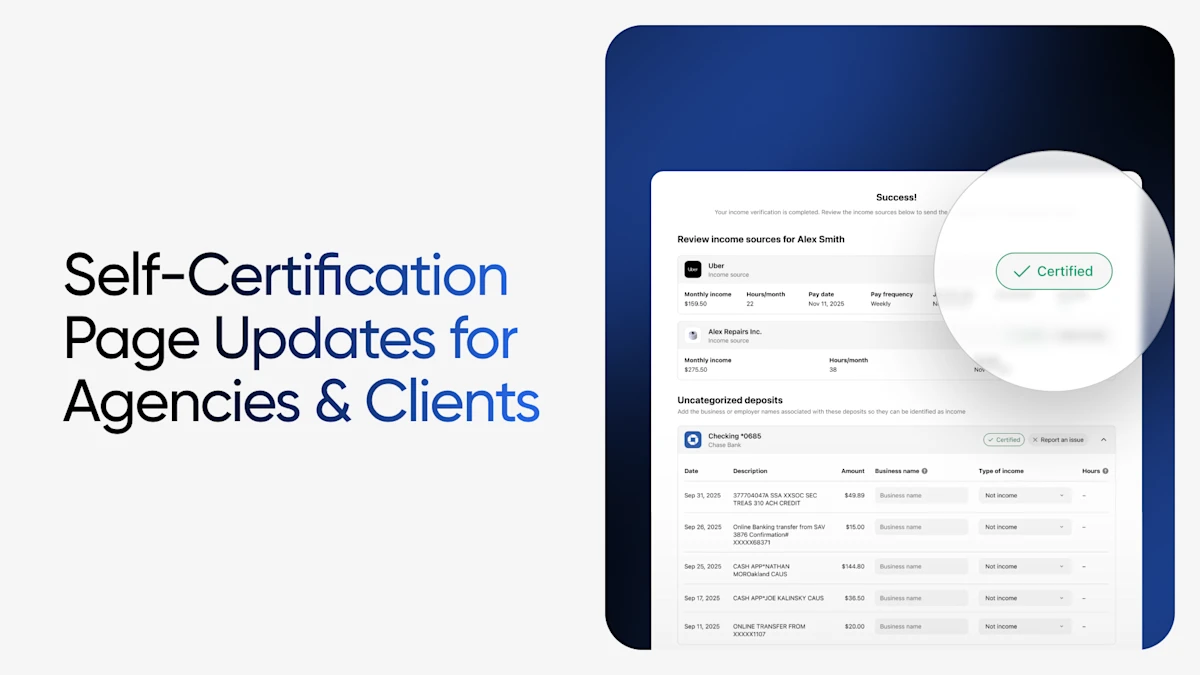
When we launched Self-Certification, the goal was simple: let clients see their own verification data and become active participants in the process. The feedback from agencies and caseworkers has confirmed that when clients can review and confirm what's being shared, everyone benefits.
This release takes that foundation further. Where the first version was built around transparency and participation, this round adds the ability to act — and it does so on both sides of the experience. Agencies get new configuration controls to request exactly the verification data they need, in the format that fits their workflow. Clients get new tools to flag what looks wrong and fill in the gaps when their full income picture isn't captured automatically.
A Quick Recap: Self-Certification for Public Sector Clients
Self-Certification lets clients review and confirm the accuracy of their income, employment, self-employment, and community engagement data immediately after connecting their sources through Truv — all within the same experience, with no separate forms or additional logins. For caseworkers, certified submissions arrive with status indicators, audit-ready timeline entries, and automatic inclusion of results in PDF reports.
New For Agencies: New Configuration Controls in Truv Templates
These enhancements live in Truv Templates in the Truv Dashboard, so your team can shape the client experience before a single verification goes out.
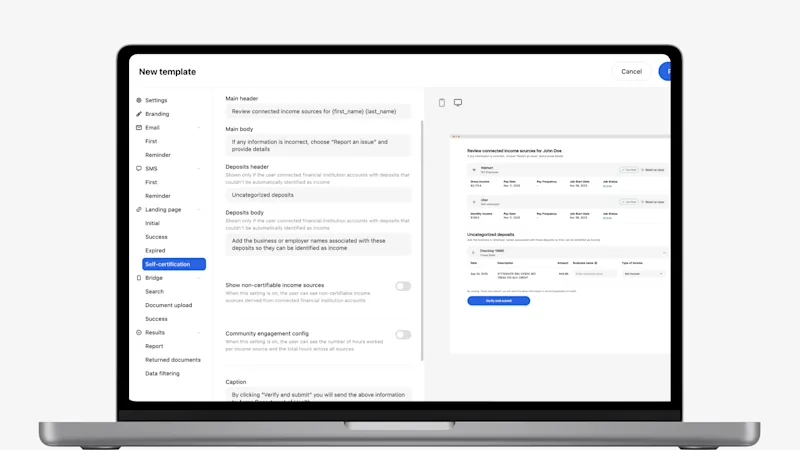
Customize the Self-Certification Page Display
Public sector teams can now tailor the client-facing Self-Certification landing page directly from Truv Templates, including page text, headers and sub-headers, button labels, body copy, and which fields appear. Self-Certification page customization can be enabled or disabled per workflow. For example, the Case Worker and Customer Portal workflows can have customization enabled, while the In-Person workflow has it disabled.
Expanded Customization for the Self-Certification Experience
Beyond the landing page and verbiage, you can now control the depth of the client experience itself:
- Enable/disable community engagement requirements — calculation of hours, customized language
- Enable/disable displaying unearned income, such as disability or benefits
- Instructional messaging clients see as they move through the flow
The result is a Self-Certification page that reflects your program's rules and language rather than a one-size-fits-all default.
Custom Product Names for Multi-Product Orders
For orders that include multiple Truv verification types, including Wage Earner Income (payroll) and Self-Employed Income (bank) products, you can now configure custom product names in Truv Templates that display to the end client. Each verification type generates its own report and appears as a separate tab in the Truv dashboard, labeled with the custom product name you configure. This keeps the language consistent with the terms your clients and caseworkers already use.
Enable/Disable Self-Employment Income
If enabled, Truv generates an income report from bank transactions. The data is presented to the user to certify the income sources from transactions for self-employment, which have no paystubs or W-2.
Bank Income as a New Bank-Based Verification Option
Bank Income is income derived from bank transactions, and is now available as a bank-based verification option alongside self-employed income verification. Agencies can configure which reports are returned: bank income, self-employed income, or both. Because Bank Income draws transaction data, it generates a Self-Certification page tailored to that information for the client to review.
Rich Text Support in Orders Loading Page
The orders landing page now supports rich text formatting, giving you more granular control over how your end-user experience looks so you can tailor every detail to your brand and preference. In Truv Templates, you can customize text display using bold, italics, links, and other styling options to craft clearer, more compelling messaging that drives stronger conversion.
New For Clients: New Ways to Complete the Picture
These enhancements give clients more control over what their results say — and more ways to make them accurate before the case ever reaches a caseworker.
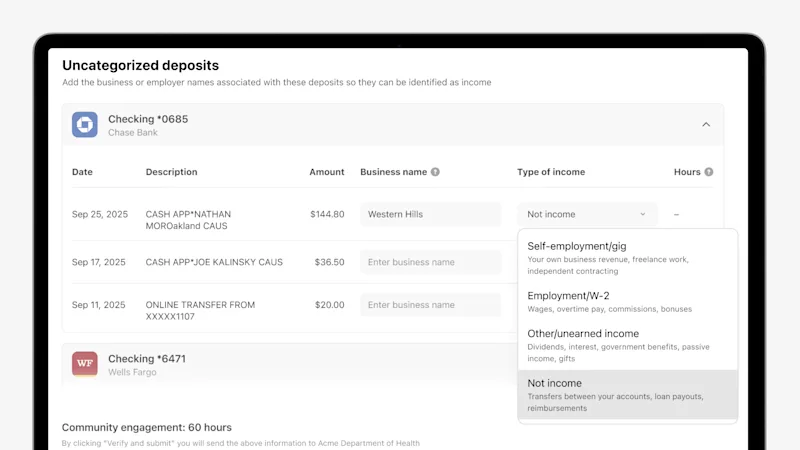
Add Unidentified Income from Bank Connections
Truv automatically identifies and categorizes income from connected bank accounts — but not every deposit arrives with clean metadata. For part-time income, informal work, and other non-traditional sources that don't get categorized automatically, clients now have a clear path to report that income on demand, in real time. In the Uncategorized Recurring Deposits section of the Self-Certification page, clients can identify and name income that wasn't captured.
Paystub Preview for Self-Certification
A paystub details preview is now available on the Self-Certification page. Because clients can see the exact pay history Truv retrieved — base salary, overtime, gross and net pay, and hours per pay period — they can certify income with full visibility into the underlying data, reducing back-and-forth and disputes after submission.
Report an Issue with Returned Results
Clients can now flag inaccuracies directly on any listed income source or employer within the Self-Certification page — without needing to contact their caseworker, call a helpline, or wait for a follow-up appointment. By selecting "Report an Issue" on any income or employer entry, clients choose a reason from a structured dropdown (for example: employment no longer active, incorrect amount, or outdated information) and can add clarifying comments before submitting. Caseworkers receive a categorized issue type with supporting context, rather than a vague flag, making resolution faster and more targeted.
Ability to Report 'Not my income' Feature
Beyond flagging inaccuracies, clients can now reject a specific deposit or income entry entirely on the Self-Certification page. When a listed deposit or income source doesn't belong to them, clients select "Not my income" on that entry to mark it as unrecognized, which is useful for shared accounts, one-time transfers, or funds that aren't part of their actual earnings. The entry is excluded from their certified income, and caseworkers see it clearly tagged as disputed rather than as part of the report.
Why This Matters for Public Sector Agencies
Together, these enhancements move Self-Certification from a review-and-confirm flow to a complete income source management view. Clients can now:
- Attest to the accuracy of automatically pulled data
- Dispute entries that don't reflect their current situation
- Identify income and community engagement that wasn't automatically captured
And agencies can now fully shape the entire experience — the fields, the language, the products, the data sources, the returned results — to match how their programs actually run. For caseworkers, that means cases arrive from a more complete and more accurate starting point, and a clear record of every client action in the case timeline. It's the kind of data quality improvement that doesn't require more staff or more manual steps; it comes from building the right tools directly into the client experience.
Getting Started
These enhancements are available now as part of the Self-Certification feature for public sector clients. Agency configuration options can be managed in Truv Templates in the Truv Dashboard; client-side enhancements appear automatically within the existing workflow.
If you're not yet using Self-Certification and want to see how it fits into your agency's verification process, contact our team.


