
Documentation Index

Fetch the complete documentation index at: https://truv.com/docs/llms.txt

Use this file to discover all available pages before exploring further.

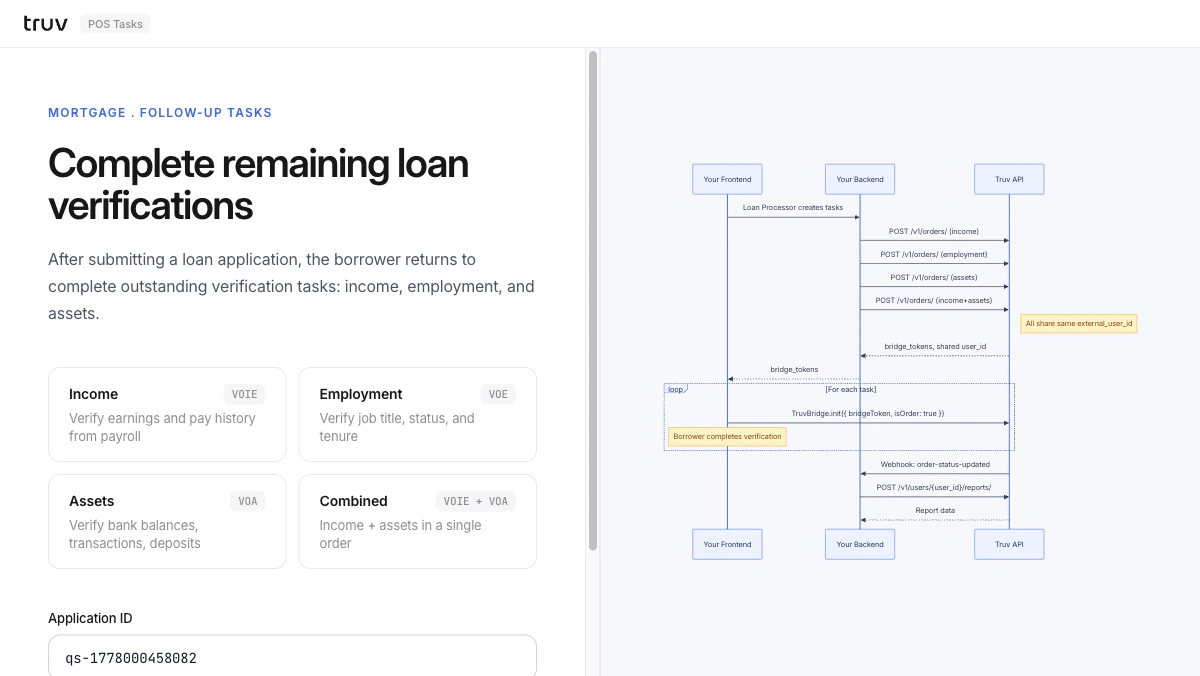
The POS Tasks demo shows the follow-up flow: after submitting a loan application, the borrower returns to complete outstanding verification tasks — income, employment, and assets — all linked by a shared external_user_id. Source: GitHub
git clone https://github.com/truvhq/demo-apps.git
cd demo-apps && npm install && cp .env.example .env
npm start && npm run dev  # select "Mortgage" → "POS Tasks"
POS Tasks demo

Flow

1

Create multiple orders

The loan processor creates separate orders for income, employment, and assets — all sharing the same external_user_id.
POST /v1/orders/  # income
POST /v1/orders/  # employment
POST /v1/orders/  # assets
2

Borrower completes tasks

Each order returns a bridge_token. Bridge opens for each task in sequence.Sandbox credentials: goodlogin / goodpassword
3

Receive webhooks and fetch reports

order-status-updated fires per task. Fetch the appropriate report for each.
POST /v1/users/{user_id}/reports/
POST /v1/users/{user_id}/assets/reports/
Integration pattern: Embedded Orders (multi-task) | Products: VOIE, VOE, VOA