Documentation Index

Fetch the complete documentation index at: https://truv.com/docs/llms.txt

Use this file to discover all available pages before exploring further.

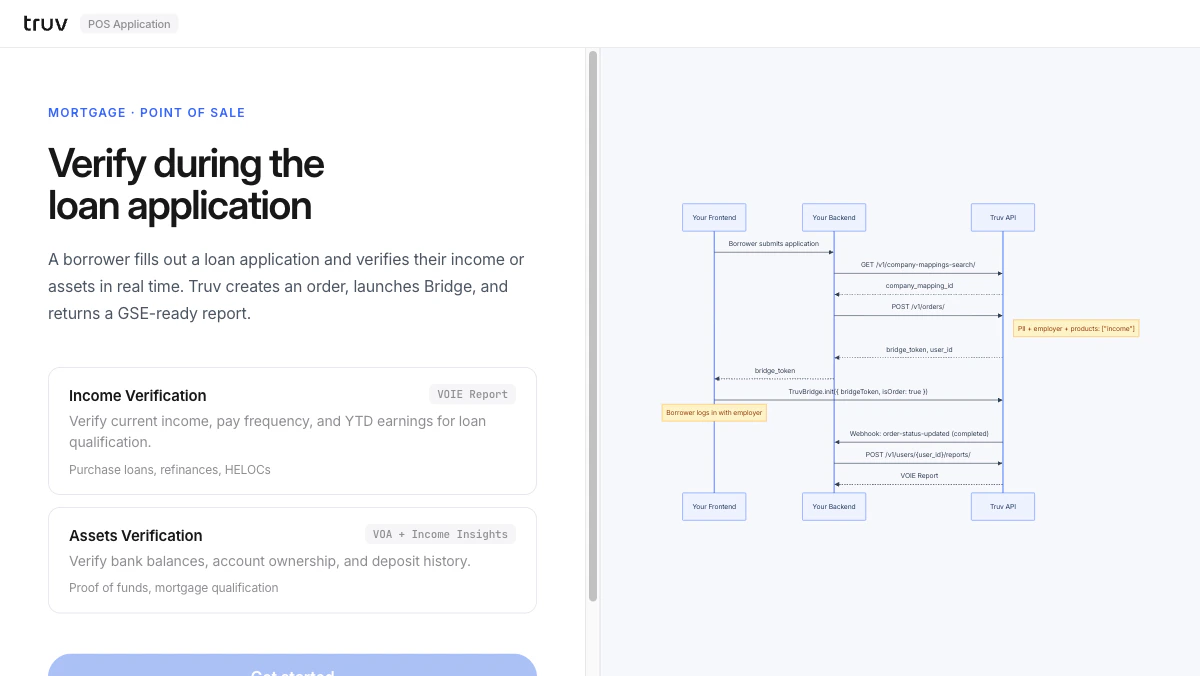
The POS Application demo shows how a borrower fills out a loan application and verifies income or assets inline, without leaving the point-of-sale. Source: GitHub
git clone https://github.com/truvhq/demo-apps.git
cd demo-apps && npm install && cp .env.example .env
npm start && npm run dev  # select "Mortgage" → "POS Application"
POS Application demo

Flow

1

Collect applicant info

Enter applicant PII. The app searches for the employer and creates an Order.
GET /v1/company-mappings-search/?query=...
POST /v1/orders/
2

Bridge verification

Truv Bridge opens inline. The borrower selects their employer and logs in.Sandbox credentials: goodlogin / goodpassword
3

Receive webhook and fetch report

order-status-updated fires on completion. Fetch the structured report.
POST /v1/users/{user_id}/reports/
Integration pattern: Embedded Orders | Products: VOIE, VOA