

Faster processing
Reduce application review time with real-time income and employment data
Less staff burden
Eliminate manual data entry, document collection, and follow-up calls
Improved accuracy
Source-verified data replaces self-reported documents and transcription
Better client experience
Clients verify in minutes from any device — no pay stubs to gather
What you can verify
Income & Employment
- Current income (gross, net)
- YTD earnings
- Employment status and employer details
- Pay frequency and history
- W-2 employment and payroll-connected gig work
Self-Employed Income
- Self-employment and gig work income via bank transactions
- Bank account balances for asset-tested programs
- Non-payroll income streams (freelance, cash, family support)
- Expense tracking for self-employment
Common use cases
Benefits eligibility determination
Benefits eligibility determination
Verify income and employment for:
- SNAP (Supplemental Nutrition Assistance Program)
- TANF (Temporary Assistance for Needy Families)
- Medicaid eligibility
- Housing assistance programs
- Child care subsidies
income, assetsProgram enrollment
Program enrollment
Speed up enrollment for:
- Low-income energy assistance (LIHEAP)
- Free/reduced school lunch programs
- Emergency rental assistance
- Veterans benefits
- Disability assistance
income, assetsRenewals and eligibility reviews
Renewals and eligibility reviews
Automate data collection for:
- Annual recertification
- Periodic eligibility reviews
- Change reporting
- Program compliance
income with automatic refreshSelf-employed and gig worker verification
Self-employed and gig worker verification
Verify income for clients without traditional W-2 employment:
- Freelancers and independent contractors
- Rideshare and delivery drivers
- Home daycare, lawn care, cleaning services
- Cash-paid and informal work
assets product makes these income streams visible. Pair with self-certification so clients can confirm or annotate their income sources.Products: income, assetsIntegration options
Option 1: Dashboard (No Code)
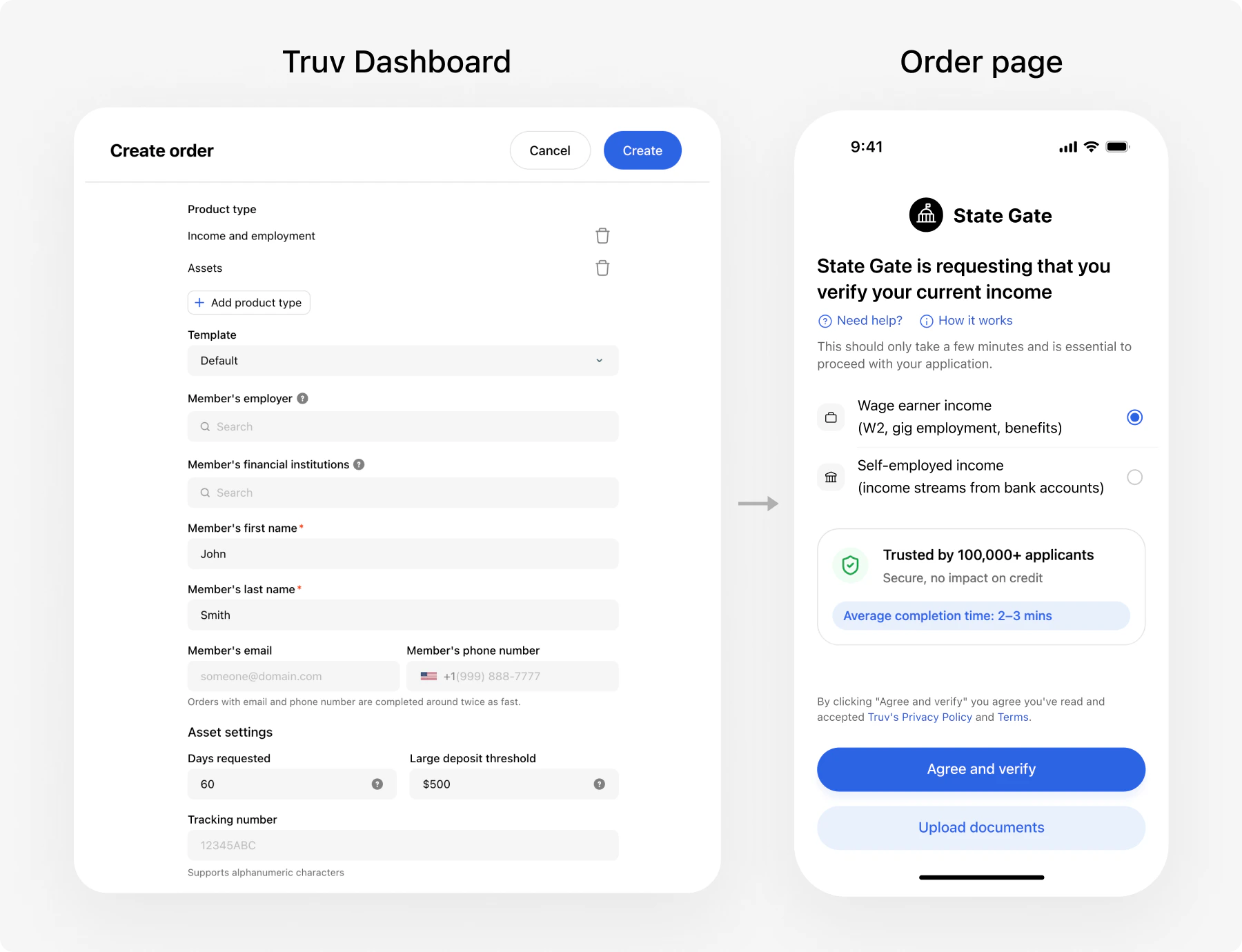
- Create orders manually via the Dashboard UI
- Send verification links to clients via email/SMS
- Caseworkers can view results directly in the Dashboard
- Configure webhooks to automatically sync verified data to your eligibility system when verifications complete
Option 2: Custom Integration (Recommended)
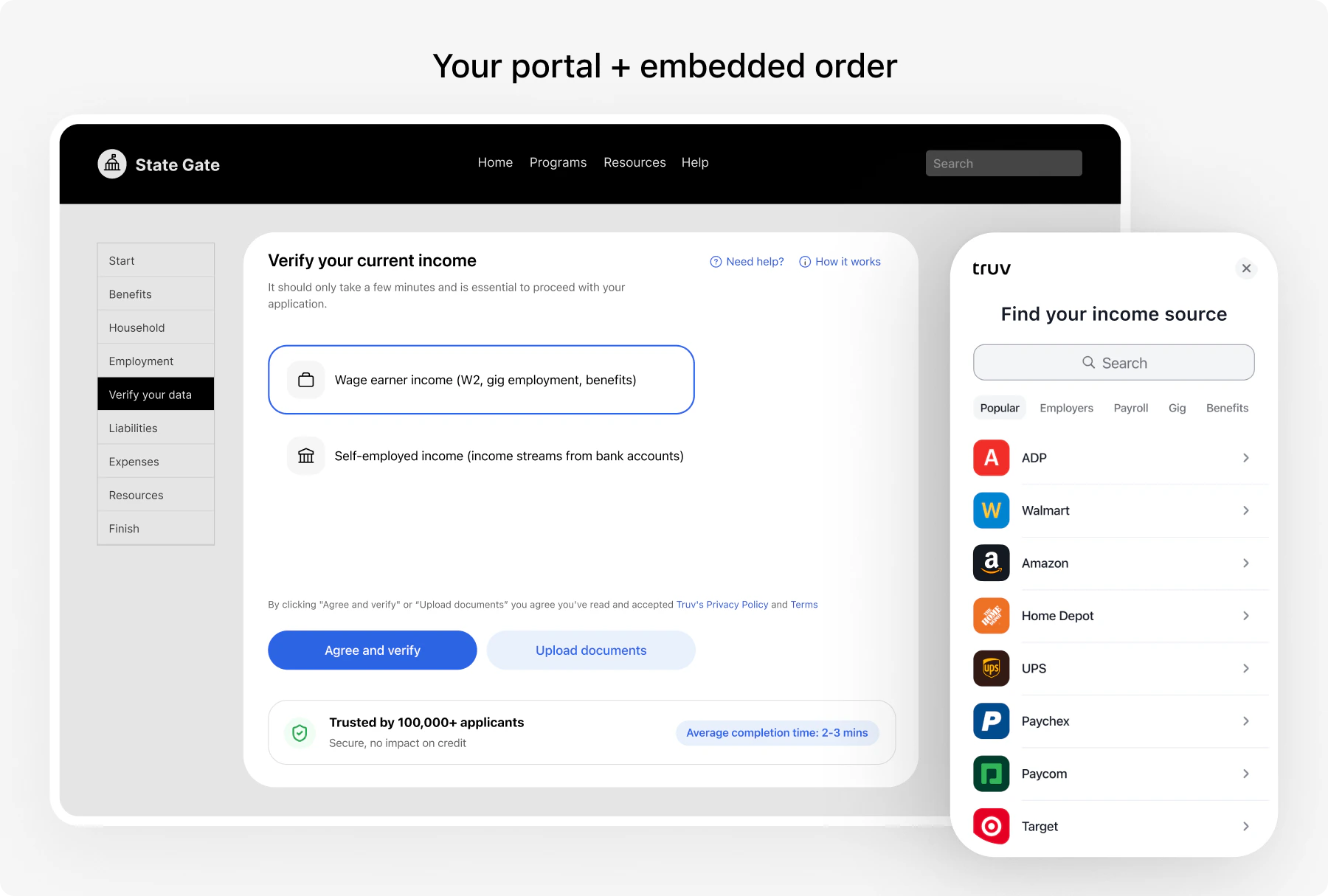
Customer Portal
Self-service verification embedded in your online benefits application
Caseworker Portal
Send verification links and view pre-filled data in caseworker screens
Contact Center
Phone agents create orders and send links during the call
In-Person Office
Clients scan a QR code at the office to verify on their own device
Renewals
Automatic data refresh at recertification — no client action when sessions are active
Document upload is a fallback within any channel, not a separate integration. When a client cannot connect their payroll provider, Bridge automatically offers document upload. See Document Processing for details.
Channel summary
| Channel | How it works | Client action |
|---|---|---|
| Customer Portal | Embedded verification in the benefits application flow | Self-service during application |
| Caseworker Portal | Caseworker creates order, Truv sends link via email/SMS | Clicks link, completes verification on their device |
| Contact Center | Phone agent creates order during the call, sends link | Completes verification after the call |
| In-Person Office | Client scans QR code at the office | Verifies on their phone while at the office |
| Renewals | Automatic data refresh from existing connections | None if session is active; re-verifies if expired |
Benefits for government agencies
Faster application processing
Faster application processing
- Reduce back-and-forth for pay stubs and employment documents
- Pre-fill eligibility workflows with verified data
- Speed up application review for straightforward cases
Reduced administrative burden
Reduced administrative burden
- Eliminate manual data entry and document collection
- Automatic data updates for recertification — no client outreach needed
- Staff can focus on complex cases instead of chasing documents
Improved accuracy
Improved accuracy
- Source-verified data eliminates transcription errors
- Real-time income data from payroll systems
- Consistent data format across all channels
Cost savings
Cost savings
- Reduce staff time spent on verification follow-up
- Lower manual processing overhead
- Reuse the same workflow for applications and renewals
Better client experience
Better client experience
- No need to gather pay stubs or mail documents
- Faster approval decisions
- Mobile-friendly — clients verify from any device
- Available in multiple languages
Self-employed and gig worker coverage
Self-employed and gig worker coverage
- Bank transaction data captures income outside traditional payroll
- Covers freelancers, gig workers, cash-paid clients
- Self-certification lets clients confirm income sources
Compliance & Security
Review Security for current platform security details. If your agency has additional compliance, retention, or procurement requirements, confirm them directly with Truv before rollout.
Threshold languages
Truv Bridge, emails, SMS messages, and landing pages support multiple languages. Pass thelocale parameter when creating an order to set the language for the client’s verification experience.
| Code | Language | Code | Language |
|---|---|---|---|
en | English | ko | Korean |
es | Spanish | lo | Lao |
ar | Arabic | pa | Punjabi |
cmn | Mandarin | pt | Portuguese |
zh | Chinese | ru | Russian |
fa | Farsi | so | Somali |
hi | Hindi | tl | Tagalog |
hmn | Hmong | th | Thai |
hy | Armenian | uk | Ukrainian |
ja | Japanese | vi | Vietnamese |
km | Khmer | ium | Mien |
Template customization
Customize the verification experience — Bridge widget branding, email/SMS copy, and landing page appearance — using templates. Passtemplate_id when creating an order to apply a specific template.
Manage templates in the Dashboard under Customization > Templates or via the Templates API.
Implementation timeline
| Phase | Dashboard (No Code) | Custom Integration |
|---|---|---|
| Setup | Configure templates, API keys, and order workflows in the Dashboard | Implement order creation, Bridge widget, webhooks, and data ingestion |
| Testing | Create test orders with sandbox credentials | End-to-end testing with demo apps and sandbox |
| Pilot | Run a limited rollout with real clients | Deploy to staging, validate data flow into eligibility system |
| Production | Full rollout | Full rollout with monitoring |
Get started
Choose your integration method
- Quick start with no code? —> Dashboard Integration
- Building custom? —> Choose a channel above (Customer Portal, Caseworker Portal, Contact Center, or In-Person Office)
Run a demo app
See a working verification flow locally. Demo setup instructions.
Test in sandbox
Use sandbox credentials to test various income scenarios — W-2 employment, self-employment, multiple employers, SSA benefits.
Resources
Integration Guide
Choose your integration channels
API Reference
Complete API documentation
Postman Collection
Import the Postman collection for hands-on API testing
Testing
Sandbox credentials and test scenarios
Schedule Demo
Talk to our government solutions team