Documentation Index

Fetch the complete documentation index at: https://truv.com/docs/llms.txt

Use this file to discover all available pages before exploring further.

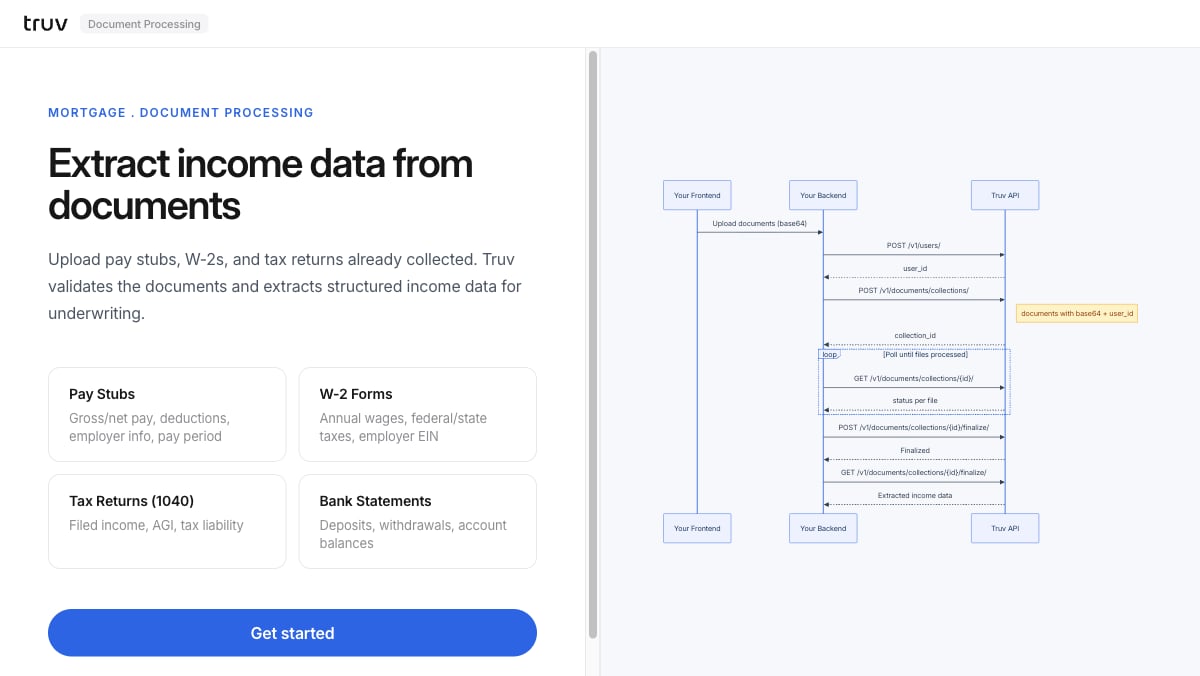
The Document Processing demo shows how to validate and extract structured income data from documents already collected — pay stubs, W-2 forms, tax returns, and bank statements — without launching Bridge. Source: GitHub
git clone https://github.com/truvhq/demo-apps.git
cd demo-apps && npm install && cp .env.example .env
npm start && npm run dev  # select "Mortgage" → "Document Processing"
Document Processing demo

Flow

1

Upload documents

Upload pay stubs, W-2s, 1040s, or bank statements. The backend creates a user and a document collection.
POST /v1/users/
POST /v1/documents/collections/
2

Poll for processing status

Poll until all files reach a terminal status.
GET /v1/documents/collections/{id}/
3

Finalize and retrieve extracted data

Finalize the collection to generate the structured income report.
POST /v1/documents/collections/{id}/finalize/
GET  /v1/documents/collections/{id}/finalize/
Integration pattern: Document Processing | Products: Pay stubs, W-2s, 1040s, bank statements