Documentation Index

Fetch the complete documentation index at: https://truv.com/docs/llms.txt

Use this file to discover all available pages before exploring further.

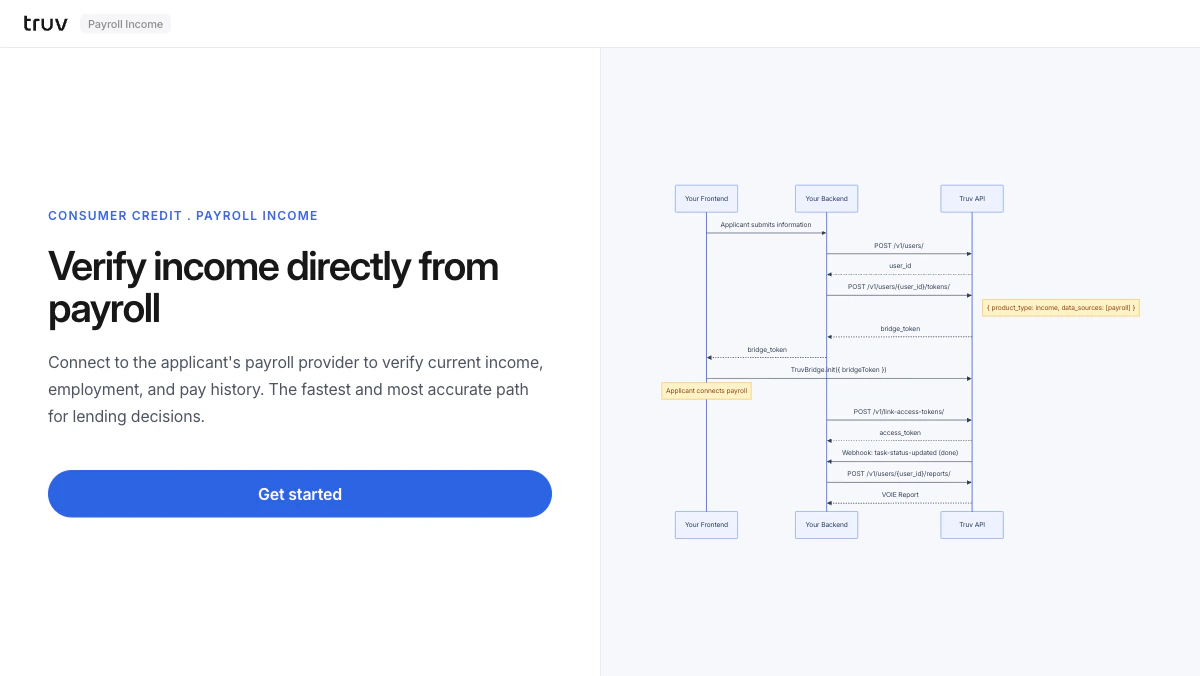
The Payroll Income demo shows the fastest path to income verification: connect directly to the applicant’s payroll provider to return current income, employment status, and pay history in a single flow. Source: GitHub
git clone https://github.com/truvhq/demo-apps.git
cd demo-apps && npm install && cp .env.example .env
npm start && npm run dev  # select "Consumer Credit" → "Payroll Income"
Payroll Income demo

Flow

1

Create user and bridge token

The backend creates a user and generates a bridge token restricted to payroll providers.
POST /v1/users/
POST /v1/users/{id}/tokens/
# { product_type: "income", data_sources: ["payroll"] }
2

Connect payroll provider via Bridge

Bridge opens showing only payroll providers. The applicant selects their employer and logs in.Sandbox credentials: goodlogin / goodpassword
3

Receive webhook and fetch report

task-status-updated fires on completion. Fetch the VOIE report.
POST /v1/users/{user_id}/reports/
Integration pattern: Bridge Widget | Products: VOIE