Documentation Index

Fetch the complete documentation index at: https://truv.com/docs/llms.txt

Use this file to discover all available pages before exploring further.

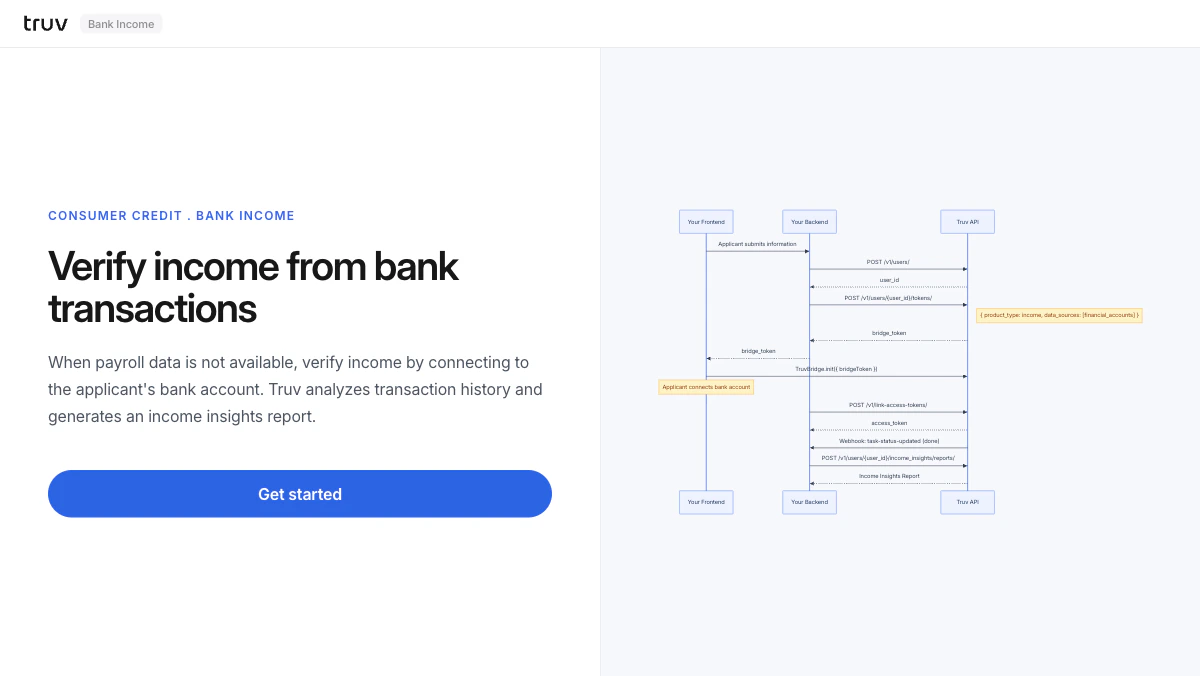
The Bank Income demo shows how to verify income by connecting to an applicant’s bank account and analyzing transaction history — use this when payroll data isn’t available for the applicant’s employer. Source: GitHub
git clone https://github.com/truvhq/demo-apps.git
cd demo-apps && npm install && cp .env.example .env
npm start && npm run dev  # select "Consumer Credit" → "Bank Income"
Bank Income demo

Flow

1

Create user and bridge token

The backend creates a user and generates a bridge token restricted to financial accounts.
POST /v1/users/
POST /v1/users/{id}/tokens/
# { product_type: "income", data_sources: ["financial_accounts"] }
2

Connect bank account via Bridge

Bridge opens showing only financial institutions. The applicant selects their bank and logs in.Sandbox credentials: goodlogin / goodpassword
3

Receive webhook and fetch report

task-status-updated fires on completion. Fetch the Income Insights report.
POST /v1/users/{user_id}/income_insights/reports/
Integration pattern: Bridge Widget | Products: Income Insights