Documentation Index

Fetch the complete documentation index at: https://truv.com/docs/llms.txt

Use this file to discover all available pages before exploring further.

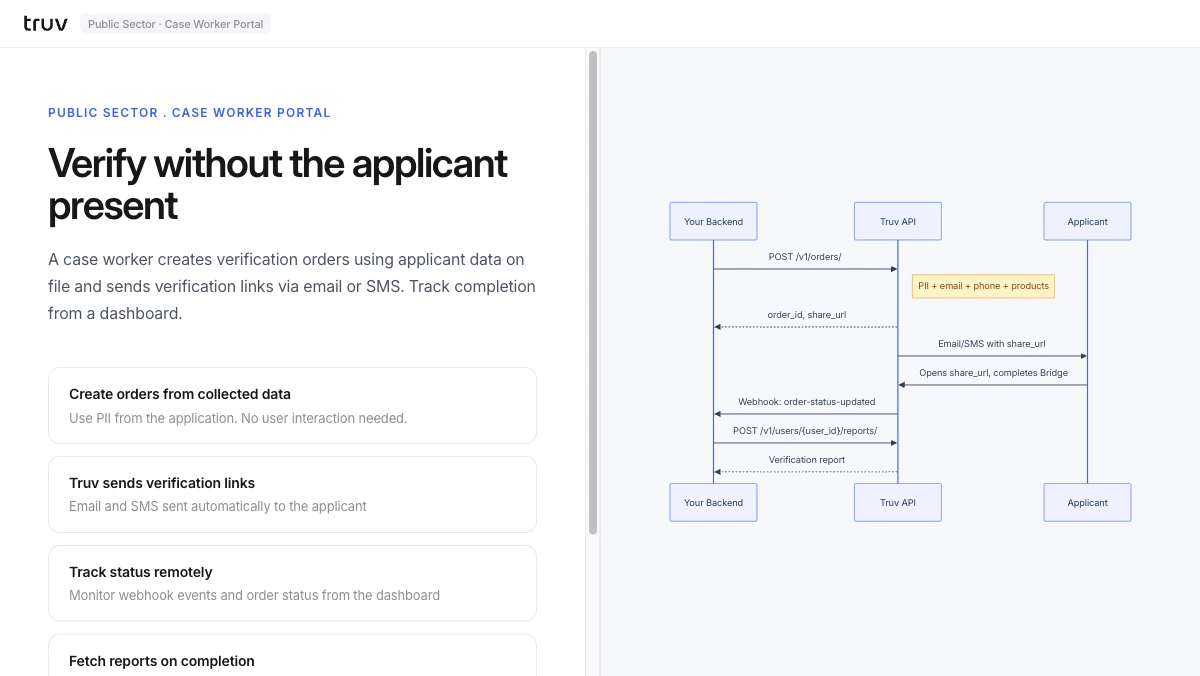
The Case Worker Portal demo shows server-side order creation for government workflows: a caseworker creates verification orders using applicant data on file, and Truv sends the applicant a link to complete verification on their own device. Source: GitHub
git clone https://github.com/truvhq/demo-apps.git
cd demo-apps && npm install && cp .env.example .env
npm start && npm run dev  # select "Public Sector" → "Case Worker Portal"
Case Worker Portal demo

Flow

1

Create order from applicant data

Enter applicant PII from the case management system. The backend creates an order and receives a share_url.
POST /v1/orders/
# Returns order_id + share_url
2

Truv sends verification link

Truv delivers the share_url to the applicant via email or SMS.
3

Applicant completes and report is ready

The applicant opens the link and connects their employer. order-status-updated fires on completion.
POST /v1/users/{user_id}/reports/
Integration pattern: Hosted Orders | Products: VOIE, VOE